"Sign into iTunes Store" window blocks me from downloading apps

I'm trying to download iMovie on my MacBook Air with Big Sur 11.5.2. Whenever I try to download it, this window prompting me to "sign into iTunes Store" pops up. I click the "Download" button but it just pops up again.

MacBook Air

Posted on Aug 2, 2022 4:15 AM

Reply
Question marked as Top-ranking reply

Posted on Aug 3, 2022 3:38 PM

Hey mkim7139,


Start with making sure that the computer is authorize: Authorize or deauthorize your computer for iTunes Store purchases.


"How to authorize or deauthorize your Mac

  1. Open the Apple Music app or Apple TV app. In the menu bar, choose Account and make sure that you're signed in with your Apple ID.
  2. Choose Account > Authorizations, then choose Authorize This Computer or Deauthorize This Computer.
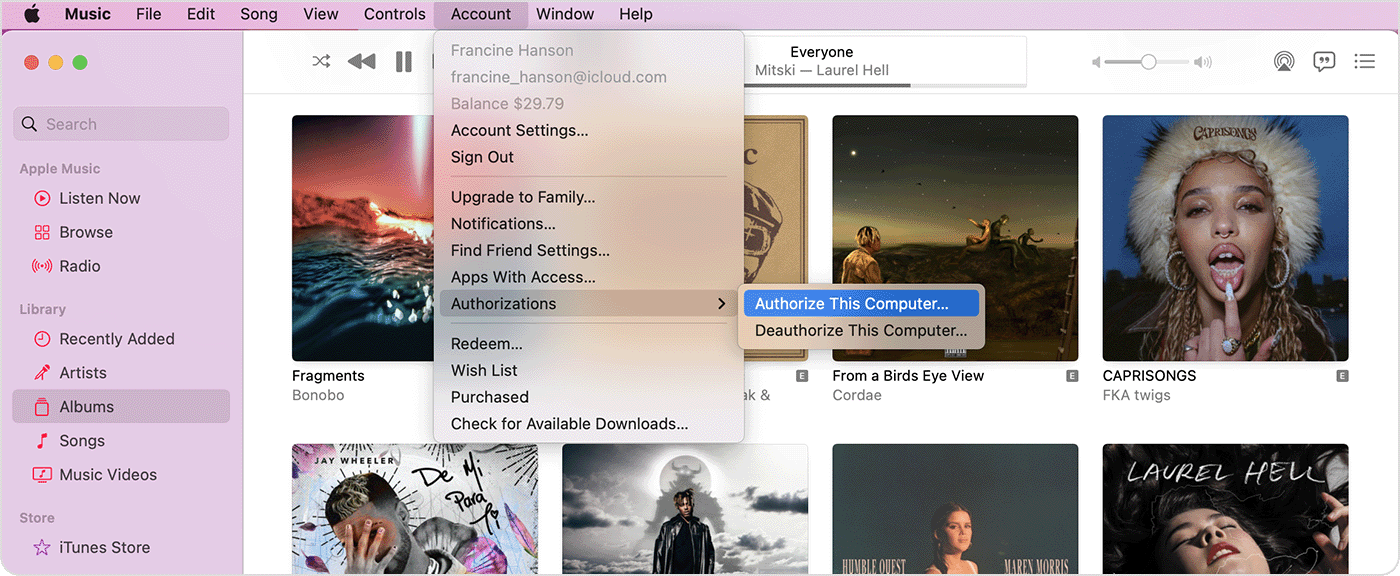
  3. Apple Music app showing the Account menu, Authorizations, and Authorize This Computer.
  4. Sign in with your Apple ID and password. Forgot your Apple ID?
  5. Click Authorize or Deauthorize."


This article should help with you not being able to download apps: If you can't download or update apps on your Mac. Follow all the steps here:


"Is the App Store available?

Check Apple’s System Status page to find out if the App Store is temporarily unavailable in your country or region.


Manually update the app

Open the App Store and update the app manually.

Learn what to do if a message says that you can't connect to the App Store.


Are you signed in with the correct Apple ID?

If you have more than one Apple ID, make sure that you’re signed in with the correct Apple ID.


Do you have a valid payment method on file?

You might need to have a payment method on file, even if the app that you want to download is free. Check the payment method you have on file and make sure that it isn't expired, declined, or failed.

If you can't update apps and a message says that “your account is disabled in the App Store”, contact Apple Support.


Restart your Mac

Restart your Mac. Then check whether you can download or update apps.


Contact Apple

If you still can't download or update apps on your Mac, contact Apple Support."


If those steps do not help, check out this resource: If you can't connect to the App Store, iTunes Store, or other Apple services.


Hope this helps. Take care.

1 reply
Question marked as Top-ranking reply

Aug 3, 2022 3:38 PM in response to mkim7139

Hey mkim7139,


Start with making sure that the computer is authorize: Authorize or deauthorize your computer for iTunes Store purchases.


"How to authorize or deauthorize your Mac

  1. Open the Apple Music app or Apple TV app. In the menu bar, choose Account and make sure that you're signed in with your Apple ID.
  2. Choose Account > Authorizations, then choose Authorize This Computer or Deauthorize This Computer.
  3. Apple Music app showing the Account menu, Authorizations, and Authorize This Computer.
  4. Sign in with your Apple ID and password. Forgot your Apple ID?
  5. Click Authorize or Deauthorize."


This article should help with you not being able to download apps: If you can't download or update apps on your Mac. Follow all the steps here:


"Is the App Store available?

Check Apple’s System Status page to find out if the App Store is temporarily unavailable in your country or region.


Manually update the app

Open the App Store and update the app manually.

Learn what to do if a message says that you can't connect to the App Store.


Are you signed in with the correct Apple ID?

If you have more than one Apple ID, make sure that you’re signed in with the correct Apple ID.


Do you have a valid payment method on file?

You might need to have a payment method on file, even if the app that you want to download is free. Check the payment method you have on file and make sure that it isn't expired, declined, or failed.

If you can't update apps and a message says that “your account is disabled in the App Store”, contact Apple Support.


Restart your Mac

Restart your Mac. Then check whether you can download or update apps.


Contact Apple

If you still can't download or update apps on your Mac, contact Apple Support."


If those steps do not help, check out this resource: If you can't connect to the App Store, iTunes Store, or other Apple services.


Hope this helps. Take care.

This thread has been closed by the system or the community team. You may vote for any posts you find helpful, or search the Community for additional answers.

"Sign into iTunes Store" window blocks me from downloading apps

Welcome to Apple Support Community
A forum where Apple customers help each other with their products. Get started with your Apple Account.