Mail not loading after iOS 18.3 Update on iPhone 15 last night

I have four email addresses and calendars and this morning after the auto-update to iOS 18.3, none of my emails are coming through on my phone. They are fine on my laptop. I have tried restarting, but I am not deleting the app and starting over like I have seen some suggesting from this happening in the past. Please advise as I am about to be away from my computer and use my phone for work emails!

iPhone 15, iOS 18

Posted on Feb 8, 2025 8:20 AM

Reply
Question marked as Top-ranking reply

Posted on Feb 10, 2025 1:45 PM

2-10-25 - Hello all on here -- I just called Apple about this mail problem that happened when my IPhone updated to the IOS 18.3. I got ahold of someone in Canada who helped me to fix this & want to let other know how to do it on here.

***Go to you Mail app & it will show you all of your "Mailboxes" such as (All, ICloud, Outlook, gmail, aol, etc. **What you have to do is go to all of them that you get your emails thru, then open for Example (ICloud) & then in the upper right hand corner there are (3) dots -- Open that up & Check "LIST" instead of Categories and it will fix that email you have chosen, then go to all of the other emails you may have listed & do the same thing & switch it back to "LIST" and it should fix all of them. **Also if you have an IPad with the Mail App Icon, do the same on there too.


This young man who helped me was located with Apple in Canada -- and he said this is a new feature for IOS 18.3, and you have to go in & change it back to LIST if this happens. **Also, he said to go to Apple.com for any updates on any new IOS Software updates or anything else with Apple. So I hope this helps everyone to fix this problem for our mail - PH

48 replies
Question marked as Top-ranking reply

Feb 10, 2025 1:45 PM in response to Elizph71

2-10-25 - Hello all on here -- I just called Apple about this mail problem that happened when my IPhone updated to the IOS 18.3. I got ahold of someone in Canada who helped me to fix this & want to let other know how to do it on here.

***Go to you Mail app & it will show you all of your "Mailboxes" such as (All, ICloud, Outlook, gmail, aol, etc. **What you have to do is go to all of them that you get your emails thru, then open for Example (ICloud) & then in the upper right hand corner there are (3) dots -- Open that up & Check "LIST" instead of Categories and it will fix that email you have chosen, then go to all of the other emails you may have listed & do the same thing & switch it back to "LIST" and it should fix all of them. **Also if you have an IPad with the Mail App Icon, do the same on there too.


This young man who helped me was located with Apple in Canada -- and he said this is a new feature for IOS 18.3, and you have to go in & change it back to LIST if this happens. **Also, he said to go to Apple.com for any updates on any new IOS Software updates or anything else with Apple. So I hope this helps everyone to fix this problem for our mail - PH

Mar 4, 2025 11:58 AM in response to Elizph71

After several attempts to fix this (including deleting and re-enabling mail accounts), I noticed that the only account in Push was the iCloud account.

I toggled every account (including the iCloud account) to "Fetch" and "Automatic" and now every email account works.

Great way to get email without doing it manually.

Not a push, but a great workaround. Hope this helps someone else.

Feb 8, 2025 8:48 AM in response to Elizph71

Remove your email account and set it up again

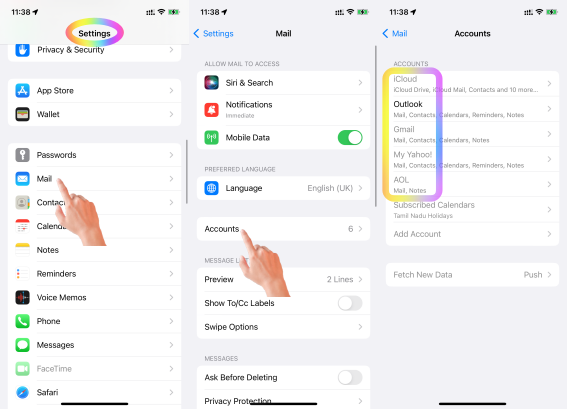
Make sure that all of your emails are there or make sure that your email is saved somewhere other than your device. On your device, go to Settings > Mail, then tap Accounts. Tap the email account that you want to remove. Tap Delete Account.


If you can't receive email on your iPhone, iPad, or iPod touch ...



If you can't send an email on your iPhone, iPad or iPod touch

  1. When you make an iOS or iPadOS backup in iCloud or iTunes, it backs up your mail settings, but not your email. ... 
  2. Make sure your device is connected to the Internet.
  3. Check with your email service provider to find out if there's a service outage.

More items...


If you can't send an email on your iPhone, iPad or iPod touch ...


Which email account are you referring to? Google, iCloud, AOL, Exchange, Outlook, Yahoo or any Other (Refer to the pic )below


  1. Is this your corporate iPhone? Then please contact the system administrator of your corporate
  2. If it is your personal device, in that case, do you have any profile installed by your corporate/organisation/enterprise/School Management?
    1. Erase the profile added by you If you have installed a profile on your own --> Install or remove configuration profiles on iPhone - Apple ...
    2. Or please contact the system administrator of the organisation who provided the profile to you


It's crucial to emphasize that when you enable 2-step verification for your Outlook (Hotmail) account, you need to utilize a specially generated app password from Microsoft to access the same account through the iOS mail app. --> Manage app passwords for two-step verification


Using an app password is essential if you enabled two-step verification for your Outlook (Hotmail) account. Two-step verification adds an extra layer of security by requiring a code from your phone or authenticator app in addition to your password when signing in. Regular passwords won't work with apps that don't support two-step verification, which is why Microsoft created app passwords. Just generate an app password for your iPhone's mail app and you'll be good to go!

Here are some additional points you might find helpful:

  • You can generate app passwords through your Microsoft account security settings.
  • App passwords are unique and only work for the specific app they're created for.
  • Consider creating strong and unique passwords for your Microsoft account and other online accounts.


This applies to Google, Yahoo and Aol too.


You may have enabled two step verification on Google --> Sign in with App Passwords - Google Account Help

You may have enabled Authenticator for Yahoo --> Generate and manage third-party app passwords | Yahoo Help

You may have activate 2-step verification for Aol --> Create and manage third-party app passwords - AOL Help



Mar 14, 2025 10:57 AM in response to Blackmac_

Thank you, thank you! This finally fixed this annoying issue for me. I had not received iCloud emails for a week. My other non-apple accounts were not affected.


Other email accounts were set to Fetch and working, iCloud was set to Push and was returning an error.

Settings > Mail Accounts > Fetch New Data


Missed some very important emails! Arghhhh, so not cool Apple!


The 18.3.1 update has generally been a huge disruption in my workflow and a big time-suck -- tinkering with settings to regain functionality and being prompted to setup new features before accessing basic functions. Big, clunky and a major drag!

Mar 10, 2025 7:16 AM in response to Elizph71

I have exactly the same experience both on my iPhone and my iPad both running 18.3.1

Important to mention is though that two different issues are mixed in this thread: one regarding the sorting of mail (primary and so forth) and the other one mails not being retrieved AT ALL!


I can definitely relate it to the battery charge: as soon as it drops below 20% neither device connects with my IMAP accounts with one exception, Gmail. All other accounts refuse to connect unless the charge is back and above 20% 😳

To me it looks like the battery saving mode gets activated without being actually activated in settings, blocking email reception.

i just updated from iOS 17 where this issue did not happen.


I will open a support ticket with Apple!

Feb 8, 2025 8:47 AM in response to Elizph71

It's not always the iOS update's fault!  Many things can cause phone problems.  If you tell people you think it's an iOS update, it might make it harder to fix or find a solution for the real issue.


Remember, the right question often leads to the solution!


Was/Is your device Jailbroken? If that's the situation, please be informed that attributing the issues to iOS updates may not be accurate.


iOS updates aim to enhance user experience, boost security, and fix bugs rather than disrupt core features. The majority of the issues after updates might stem from underlying, unmentioned factors. Updates won't typically alter personal data but may refine settings or features. Backup before major updates for safety. Review Apple's update details and backup advice for a smooth process.


Kindly consider checking your settings and addressing any device issues before attributing the issue to external factors. This could be a pure coincidence that the iOS update affected the iPhone functions.


Before initiating a standard iOS update, it's advisable to create a backup. Have you completed this step? If yes, proceed with the restoration from the backup.


See what each update does: About iOS 18 Updates, About iOS 17 Updates, About iOS 16 Updates, About iOS 15 Updates, About iOS 14 Updates, About iOS 13 Updates, About iOS 12 Updates, and so on...


Feb 9, 2025 1:10 PM in response to Elizph71

Yeah, this is ridiculous. I don’t like how they’re forcing AI on everything because it’s causing a lot of problems. I have it in my Outlook on my computer with Microsoft AI. And apples AI on our phones…. so I mean I’m missing very important emails just like a bunch of other people are and you can’t get a hold of anybody to fix it Makes you wonder are they liable just like we would be liable if we caused them to lose money

This thread has been closed by the system or the community team. You may vote for any posts you find helpful, or search the Community for additional answers.

Mail not loading after iOS 18.3 Update on iPhone 15 last night

Welcome to Apple Support Community
A forum where Apple customers help each other with their products. Get started with your Apple Account.
