Apple Fitness+ disconnecting from device

For the second day in a row this has happened. Both days it happened on the 2nd workout selected. First workout was fine, connected to the watch, status updated all in real time. During the 2nd workout immediately after, it started fine and was updating the stats but about halfway through the workout the stats onscreen on the Apple TV stopped updating even though the workout was still going, both on the watch (with accurate stats) and the Apple TV with progressing workout, but not the up to date stats from the Apple Watch. A few minutes later an error message popped up saying the connection to the device was lost and the workout stopped. You can't pick up or continue a workout where you left off. Has anyone else had this problem?

Apple Watch

Posted on Dec 15, 2020 2:03 PM

Reply
Question marked as Top-ranking reply

Posted on Dec 19, 2020 11:15 AM

I also have seen that it could be an AirPods issue. I had found a way around the disconnect problem ending the workout by doing the following:


1)When the stats stop updating on the Apple TV, pause the workout on the TV and then pause the workout on the watch

2)Go to settings on the watch and turn Bluetooth off. Wait a few seconds and then turn bluetooth on.

3)Go to the workout on the watch and resume.

4)Resume the workout on the TV.


After a few seconds all of the stats from the watch and TV will be back in sync and it doesn't disconnect


However, on a longer workout I had this happen 3 times so it was annoying to constantly do this, especially at high intensity. So, I disconnected my AirPods from the Apple TV they were connected to and just put them back in the case. No more problems then. Don't know if this is a red herring, but it definitely does seem to be an AirPods/Dual Bluetooth connection conflict.

Similar questions

214 replies

Jan 28, 2021 4:19 AM in response to riche348

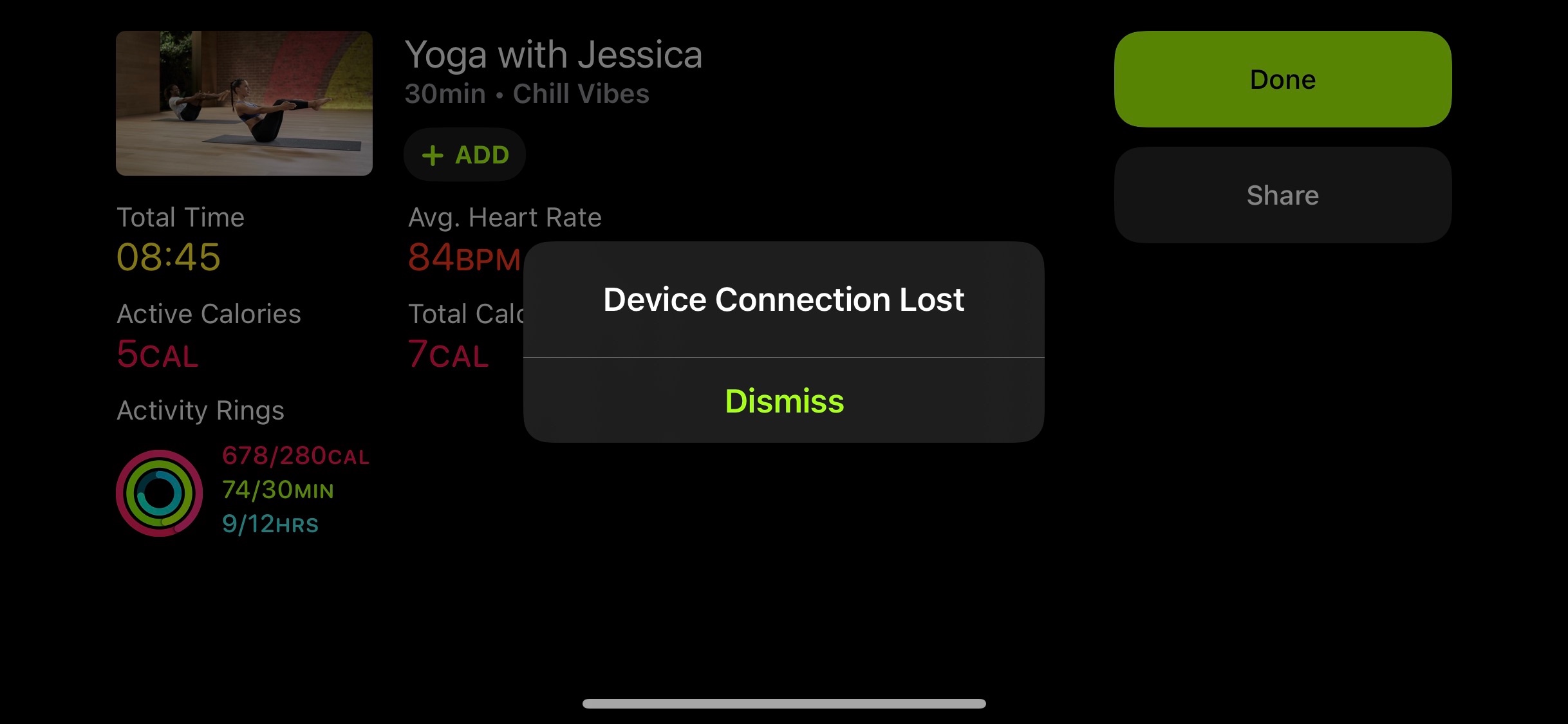
I, too, have been struggling with this issue since the AppleFitness+ release, and have done all the trouble shooting, as husband himself is an app developer and has helped me try to come up with solutions, but to no avail. I’ve unpaired and repaired my watch and updated all my devices. I don’t use AirPods for workouts, so the AirPods are unrelated. This is definitely not just an issue with the AppleTv either; I’ve gotten the same error with my IPad Pro and IPhone as well, both during Yoga and Rowing workouts at varying times into them (hence the screen shot). The only temporary solution I’ve come up with is to turn Bluetooth off in the setting of my IPad and choose the “Workout Without Watch” option. I then set an independent workout on my watch, and play the workout without being able to see my metrics or burn bar on the screen, without being able to play and pause with my watch, and without being able to see the record of the specifics workouts I’ve done, making it essentially a basic workout video.

It can be very jolting and even dangerous to abruptly end intense cardio, like with rowing, where my heart rate is at 170BPM. The intention to not be able to scrub through the workouts is a (stupid) intentional one on their part, not an accident. If they want to push people to Peloton, where you can scrub through a video, this is a great way to do that (though I *really* don’t want to go the Peloton route!) The fact that you can’t resume where you left off when you get the disconnection error is just mind boggling, and shows that they shipped this too soon. It’s a shame because the teachers are excellent! They and the users, especially the paying ones, deserve better.


Feb 7, 2021 8:28 AM in response to mrtob

I have the same issue: Here are my symptoms.


Apple TV HD (tvOS 14.4)

iPhone 11 Pro Max (iOS 14.4)

Apple Watch Series 6 (watchOS 7.2)

Powerbeats Pro


Issue: While utilizing the Apple Fitness+ App (Cycling) with my Apple Watch Series 6 and Powerbeats Pro - the workout initially starts fine with audio to my headphones and tracking calories/heart rate with my Apple Watch. Approximately 5 minutes into the workout - the watch stops updating the calories/heart rate stats on screen. If I switch from Powerbeats Pro audio back to TV Audio - the stats update and then an error on the screen states, "Device Disconnected."


Possible Cause: It appears that the Apple TV and Apple Fitness+ app are unable to correctly connect to BOTH a watch AND your headphones. I have tried this with my iPhone and am able to use watch and headphones.

Feb 9, 2021 7:04 AM in response to McMara

Since my last post, I have successfully completed several 45-min workouts without a disconnection. I ensured both my iPhone and the Apple TV remote (as well as any other Bluetooth device) are not near me when on the treadmill. I was planning to mount the Apple TV behind my TV, but I'll get a shelf to put it above or below the TV. Hopefully this will keep working.

Jan 16, 2022 3:28 PM in response to mrtob

Hi All,


I just replaced by aTV 3rd gen with an ATV4K (moving the old one into the bedroom) and I have not had an issue since. I understand that this is not an acceptable solution, but I hope it helps someone in the troubleshooting process.


I have spent many hours on this, updating, disconnecting, logging out and logging in and trying different combinations of hardware and for me it seems the issue was clearly the combination of Airpods Pro and aTV 3rd Generation.


I did have a case open with Apple but I just didn't have the time to try something, do half a workout only to have it fail, and then be asked to try something else. But I will update them on this latest information and maybe they can come good in finding out how the hardware differs.

Jan 13, 2021 9:16 PM in response to dkuntz01

I guess I'd just like to add (as some other people have) that this issue occurs even on the latest 64Gb Apple TV and with no other Bluetooth devices connected

. I do not own AirPods and I still receive disconnects all the time.


This issue is likely a universal software bug independent of the use of AirPods.


I have not had this problem when viewing Fitness+ on my iPad, only on the Apple TV.

This thread has been closed by the system or the community team. You may vote for any posts you find helpful, or search the Community for additional answers.

Apple Fitness+ disconnecting from device

Welcome to Apple Support Community
A forum where Apple customers help each other with their products. Get started with your Apple Account.