Mail's All Bins and All Junk disappear from Favourites

Running Mac Mail Version 16.0 (3864.200.81.1.6) on Tahoe 26.1 on MacBook M1. English is UK, therefore 'Bin' for 'Trash'.


Mail directories 'All Bins' and 'All Junk' are not around in Mail below 'Favourites' initially. After having added them to Favourites, they will have disappeared from there when quitting and restarting Mail.


Reason and repair?

MacBook Pro (M1 Pro, 2021)

Posted on Nov 18, 2025 6:31 AM

Reply
7 replies

Nov 18, 2025 1:00 PM in response to leroydouglas

Thank you for your reply and recommendations.


I am uncertain when the issue has appeared first, because I have only now tried to add 'All Bins' and 'All Junk' to ‘Favourites’.


Restarting mail.app with shift pressed does not resolve it – also in this case both folders are no more around afterwards.


On my Intel macbook running Mail Version 16.0 (3731.700.6.1.21) on Ventura 13.7.8 mail.app does not lose any favourites – as its behaviour is supposed to be.


Another observation about mail.app in Tahoe: when removing a favourite eg ‘VIP’ and then restarting Mail, the favourite just removed is around again – like added favourites disappear.


Maintaining Favourites (adding/removing VIP, All Bins, All Junk, …) obviously does not work in Tahoe as of now..

Nov 18, 2025 1:24 PM in response to foreSurName

Unfortunately none of your recommendations work.


If removing the account altogether and then adding it back in as new does not resolve the issue...Then I do not know what to tell you.


I do not have the issue in Tahoe26.0, 26.01, currently 26.1


further you can Call Customer Support  (800) MYAPPLE (800–692–7753)


or on line  https://getsupport.apple.com/


Outside the USA—Contact Apple for support and service by phone

See a list of Apple phone numbers around the world.

Contact Apple Support - Apple Support 


Nov 18, 2025 8:03 AM in response to foreSurName

foreSurName wrote:

Running Mac Mail Version 16.0 (3864.200.81.1.6) on Tahoe 26.1 on MacBook M1. English is UK, therefore 'Bin' for 'Trash'.

Mail directories 'All Bins' and 'All Junk' are not around in Mail below 'Favourites' initially.

After having added them to Favourites, they will have disappeared from there when quitting and restarting Mail.

Reason and repair?


Seems odd.


This happened going to the 26.1 point-update(?) or the Full upgrade to Tahoe...?


This is the first report I have heard either as a Tahoe macOS 26.0 upgrade, or point-update 26.1


You can try quitting Mail.app and relaunch it holding the Shift key down and compare your results.


Then add back in your Favorites:
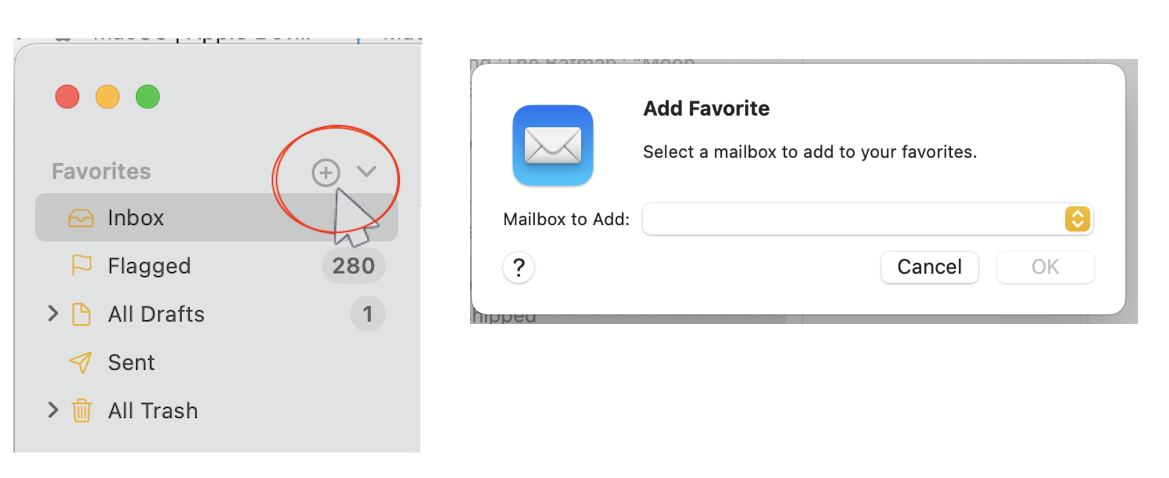


no resolve— you can delete the mail account and add it back in to sort issue:


Remove or temporarily turn off email accounts in Mail on Mac


Add email accounts in Mail on Mac


Note—

IMAP accounts stay on the server, so no local loss, when you re-sync

POP accounts download and remove from the server—therefor save your inbox/sent box if you want them

“On My Mac" is just that, local folders you created and moved mail into. So no loss


To be proactive you can file a bug report / submit your feedback direct to the product Team here:

Feedback - Mail - Apple


Mail.app is baked in to the macOS— you can reinstall the macOS on top of the existing macOS as an option.

How to reinstall macOS Recovery (both M1/M2/M3/M4 and Intel) — How to reinstall macOS - Apple Support




Mail's All Bins and All Junk disappear from Favourites

Welcome to Apple Support Community
A forum where Apple customers help each other with their products. Get started with your Apple Account.