System running slow and fan noisy with Adobe apps

I'm facing problem whenever working with adobe editing tools and browsers. my system running slow and fan making noise (speed up). Please suggest me how i can use smoothly.

MacBook Air 13″, macOS 15.7

Posted on Nov 13, 2025 1:20 AM

Reply
Question marked as Top-ranking reply

Posted on Nov 13, 2025 2:16 AM

Restart in Safe Mode. This will perform a Disk Repair, clear cache files and only load Apple Software, extensions and fonts. The boot up will be slow and can take some time - Normal.


Safe Mode will also eliminate Third Party Software, extensions and drivers from loading. It will only load the Minimum amount of Core Apple Processes to allow the the computer to function at a reduced Level of Performance 


Does the issue present in this mode ?


Sometimes a Safe Boot followed by a Normal Boot will just put things right.


If not - there could be something in the main User Account playing up. To further isolate this - Set up users, guests, and groups on Mac. Then log out of the Main User account and log into the dummy account and test again if the issue persists.


If the issue is present in the dummy account - then, this appears to be a System Wide issue on the computer.


Part 2 of 2


To Drill Down further and to avoid a session of Q&A, Q&A  and Q&A  


Download the Application Etrecheck  ( External Link ) directly from the Developer.


The Application is Not a " Silver Bullet "  and is  only a tool to examine the Hardware / Software used on this computer 


This is a Diagnostic Tool that makes no changes to the computer Hardware / Software used on this computer 


The application is free or paid from added features. 


The Report will Not Reveal Any Personal Information. 


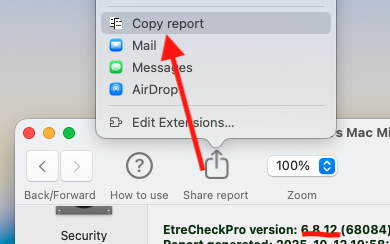
Post back the Full Report - copy and paste - >>>> using the Additional Text Icon ( 3rd Icon to last ) <<<<


4 replies
Question marked as Top-ranking reply

Nov 13, 2025 2:16 AM in response to tripuresh128

Restart in Safe Mode. This will perform a Disk Repair, clear cache files and only load Apple Software, extensions and fonts. The boot up will be slow and can take some time - Normal.


Safe Mode will also eliminate Third Party Software, extensions and drivers from loading. It will only load the Minimum amount of Core Apple Processes to allow the the computer to function at a reduced Level of Performance 


Does the issue present in this mode ?


Sometimes a Safe Boot followed by a Normal Boot will just put things right.


If not - there could be something in the main User Account playing up. To further isolate this - Set up users, guests, and groups on Mac. Then log out of the Main User account and log into the dummy account and test again if the issue persists.


If the issue is present in the dummy account - then, this appears to be a System Wide issue on the computer.


Part 2 of 2


To Drill Down further and to avoid a session of Q&A, Q&A  and Q&A  


Download the Application Etrecheck  ( External Link ) directly from the Developer.


The Application is Not a " Silver Bullet "  and is  only a tool to examine the Hardware / Software used on this computer 


This is a Diagnostic Tool that makes no changes to the computer Hardware / Software used on this computer 


The application is free or paid from added features. 


The Report will Not Reveal Any Personal Information. 


Post back the Full Report - copy and paste - >>>> using the Additional Text Icon ( 3rd Icon to last ) <<<<


Nov 13, 2025 9:19 PM in response to tripuresh128

tripuresh128 wrote:

I'm facing problem whenever working with adobe editing tools and browsers. my system running slow and fan making noise (speed up). Please suggest me how i can use smoothly.

I work with some photographers who use Adobe apps (including Lightroom, Illustrator, etc.) and when the amount of free space falls below about 15% the fans start up and performance slows down. This of course depends on what you are doing, how many images, etc. but some Adobe apps use a prodigious amount of "scratch" space, temporary disk space that can become enormous. This may or may not be relevant to your issue.


Other causes can include anti-virus and third party "Security" suites. These often work poorly with the MacOS.


Follow Owl-53 and den.thed's suggestions, including posting the Etrecheck report (which will reveal how much free space your disk has and also whether anti-virus or other problematic items are running in the background).

System running slow and fan noisy with Adobe apps

Welcome to Apple Support Community
A forum where Apple customers help each other with their products. Get started with your Apple Account.
