Removing duplicate photos from iPhone and iCloud

On the photo app on my phone there are very many duplicated photos. I also have photos on icloud with the same problem. Is there a smart method to remove the duplicates? If possible I want icloud to hold all my photos and have some of the on my iphone?


[Re-Titled by Moderator]

Original Title: Duplicate photos


iPhone 13, iOS 18

Posted on Nov 7, 2025 1:23 AM

Reply
Question marked as Top-ranking reply

Posted on Nov 7, 2025 7:23 AM

iCloud Photos is a synchronization service. When you engage iCloud Photos on a device, then the Library on that device is kept exactly the same as the iCloud Photos Library. So, for instance, if you take a picture with your iPhone, it is added to the iPhone's Photos Library, copied to iCloud Photos Library, and then copied to the Photos Library on each of the other devices that you have connected. If you delete a picture on your Mac, then that picture is deleted at iCloud and on all the other devices. You can't have more or different pictures on the iPhone than at iCloud.com.


And you can't think of iCloud Photos as a backup service, since it backs up mistakes, and there's no way to undo them. Whatever you do with Photos on your device-- it happens everywhere else.


iPhone Photos has its own Duplicate Finder in the Utilities section, usually at the bottom of the Photos window.
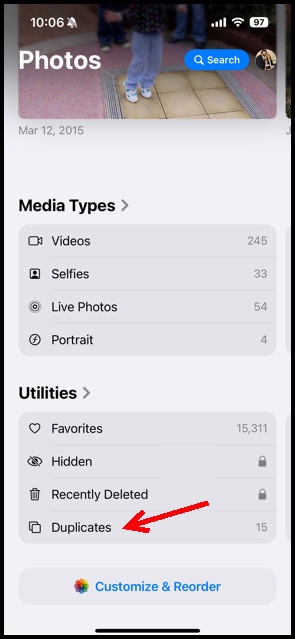

Be very careful-- it will show both exact duplicates and similars. You should look at each pair before merging them or deleting one. Here is an example of a pair that Photos has been pointing out to me for years:

They're different, a I want to keep both!


1 reply
Question marked as Top-ranking reply

Nov 7, 2025 7:23 AM in response to sverre54

iCloud Photos is a synchronization service. When you engage iCloud Photos on a device, then the Library on that device is kept exactly the same as the iCloud Photos Library. So, for instance, if you take a picture with your iPhone, it is added to the iPhone's Photos Library, copied to iCloud Photos Library, and then copied to the Photos Library on each of the other devices that you have connected. If you delete a picture on your Mac, then that picture is deleted at iCloud and on all the other devices. You can't have more or different pictures on the iPhone than at iCloud.com.


And you can't think of iCloud Photos as a backup service, since it backs up mistakes, and there's no way to undo them. Whatever you do with Photos on your device-- it happens everywhere else.


iPhone Photos has its own Duplicate Finder in the Utilities section, usually at the bottom of the Photos window.


Be very careful-- it will show both exact duplicates and similars. You should look at each pair before merging them or deleting one. Here is an example of a pair that Photos has been pointing out to me for years:

They're different, a I want to keep both!

Removing duplicate photos from iPhone and iCloud

Welcome to Apple Support Community
A forum where Apple customers help each other with their products. Get started with your Apple Account.