How to remove the Messages app on iMac for security reasons?

I do not use, do not want to use, have never used the Messages application.


It continues to demand I log in to it/update my password.


I wish to remove this application, primarily for security purposes as it is clearly intrusive in it's demands to invade my privacy. How is this done?


[Re-Titled by Moderator]

Original Title: Remove the messages application

iMac 27″, macOS 15.4

Posted on Nov 1, 2025 1:26 AM

Reply
Question marked as Top-ranking reply

Posted on Nov 1, 2025 2:30 PM

Messages can't be deleted off a Mac, as with other native apps. But you can effectively remove it by turning it off in System Settings then removing it from your Dock. When you have the Messages app open, tap Messages in the top left menu bar, Settings, iMessage, Sign Out. Note you may have to log into it with your updated password before you can sign out.

5 replies
Question marked as Top-ranking reply

Nov 1, 2025 2:30 PM in response to Wibbling

Messages can't be deleted off a Mac, as with other native apps. But you can effectively remove it by turning it off in System Settings then removing it from your Dock. When you have the Messages app open, tap Messages in the top left menu bar, Settings, iMessage, Sign Out. Note you may have to log into it with your updated password before you can sign out.

Nov 8, 2025 2:31 PM in response to Wibbling

Wibbling wrote:

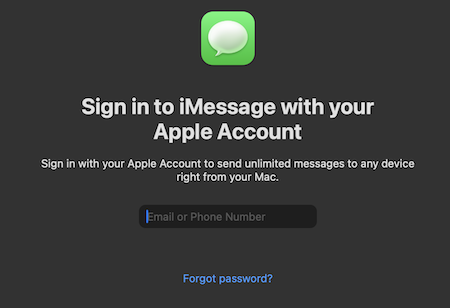
Righty, this is NOT messages. The pop-up references iMessage. NOT Messages.

To be clear the iMessage sign in IS for the Messages app. When you open the Messages app on your Mac, if you see a prompt that says "Sign in to iMessage with your Apple Account", then you are good and not signed into iMessage on your Mac. If you don't see that when launching Messages, then you are using your Apple Account for iMessage and you will need to sign out in the app.


Since you referenced the same message on your iPad, then on your iPad you should go to Settings > Messages > iMessage, and make sure that is turned off. With you trying to remove iCloud from your iPad, then you just need to make sure Settings > [name on top] > iCloud > Show All > Messages is turned off. There is a similar setting on your Mac. There is no on/off switch for iCloud, you just have to turn off all apps there so it is not used.


The Account Recovery process IS only for when using 2FA as you can see on the Support Page for using it. As long as you are never going to forget your Security Questions, including the exact syntax, and forget your password, then you are fine without it. Otherwise you will be locked out of your account and will be forced to create a new one. That is what Account Recovery prevents.


If you use two-factor authentication and can’t sign in or reset your password, you can regain access after an account recovery waiting period.

How to use account recovery when you can’t reset your Apple Account password - Apple Support


There is no requirement to be signed into iMessage on your Mac, as I do not use it either and receive no pop-ups. For reference, here is the what I see when launching the Messages app on my Mac where I am not signed in. That would only appear when launching the Messages app, and there are no Popups telling me I need to sign into iMessage.
Nov 5, 2025 2:08 PM in response to Wibbling

Wibbling wrote:

I don't have it in my dock and I cannot see how to disable it in settings.

A pop up appears 5 or six times a day, stealing focus until I enter my apple password. I don't want it. This is a huge security, let alone privacy intrusion.

That ignores the constant nags from Apple to 'upgrade account security - force MFA - which I also do not want.

I can tell you I do not use Messages on my Mac and there are no pop ups that are asking for my Password to it.

  • Are you sure you are signed out of Messages after opening the app?
  • Do you have Messages turned on for iCloud at  > System Settings > [name on top] > iCloud > Messages?


As for 2FA, there are some services you will not be able to use if you do not upgrade. Attempting to use one of those services is going to require you to turn on 2FA. Why you don't want to is up to you, but that means you are using Security Questions which are no longer secure and easily forgotten. If someone else attempts to sign into your account and don't know your password, it will be locked. There is no account recovery when using Security Questions, so make sure they are current and you know what the exact text is to the answer.


Nov 5, 2025 1:42 PM in response to Zachyy

I don't have it in my dock and I cannot see how to disable it in settings.


A pop up appears 5 or six times a day, stealing focus until I enter my apple password. I don't want it. This is a huge security, let alone privacy intrusion.


That ignores the constant nags from Apple to 'upgrade account security - force MFA - which I also do not want.

Nov 8, 2025 1:27 PM in response to Mac Jim ID

Righty, this is NOT messages. The pop-up references iMessage. NOT Messages.


I have never used Messages in all the time I have owned my iMac, some 6 years. Never signed in to it. However, again, the intrusive pop-up is for iMessage.


I don't use iCloud on my iMac. I am trying to remove it from my iPad.


Is it remotely related that my iPad also demands I 'enter password'?


There is account recovery for security questions. 2FA is not necessary. I store such info in a password safe.


I object to the intrusive demands to 'log in' or 'enter my password' for software I do not want or use.

How to remove the Messages app on iMac for security reasons?

Welcome to Apple Support Community
A forum where Apple customers help each other with their products. Get started with your Apple Account.