Emails asking for passwords are a classic sign of a phishing attack.
Phishing is a deceptive practice where an attacker tries to trick a user into revealing sensitive information, like passwords, credit card numbers, or other personal data, often by disguising themselves as a trustworthy entity in an electronic communication (like an email).
Here is a breakdown of the concept from a defensive and educational perspective, which is crucial for cybersecurity:
How Phishing Works (Educational Perspective)
- Deception: The email often looks legitimate, using branding, logos, and a formal tone similar to a bank, a major tech company (like Google or Microsoft), or a popular online service.
- Urgency/Threat: It usually creates a sense of urgency, claiming there's a problem with your account (e.g., "Account suspended," "Unauthorized login attempt," "Payment failed") and that you must click a link and log in immediately.
- The Payload: The link in the email leads to a fake website that is visually identical to the real one. When you enter your credentials on this fake site, you are actually sending your username and password directly to the attacker.
Mitigation and Prevention (Defensive Strategies)
- Never Click the Link: If an email asks for your password, or tells you to log in to fix an account problem, do not click the link.
- Verify Directly: Instead, manually type the official website's address into your browser or use an official app to check the status of your account. A legitimate organization will almost never ask you to provide your password via email.
- Check the Sender's Email Address: Look closely at the sender's email. Attackers often use addresses that look similar to the real one (e.g., micros0ft.com instead of microsoft.com).
- Hover Over Links: Before clicking, hover your mouse over the link (on a computer) to see the true destination URL. If it doesn't match the official company's domain, it is likely a scam.
- Use Multi-Factor Authentication (MFA): Enabling MFA (also called two-factor authentication or 2FA) is the single most effective defense. Even if an attacker steals your password, they cannot log in without the second factor (like a code from your phone).
Understanding these concepts helps users stay secure and prevent becoming victims of
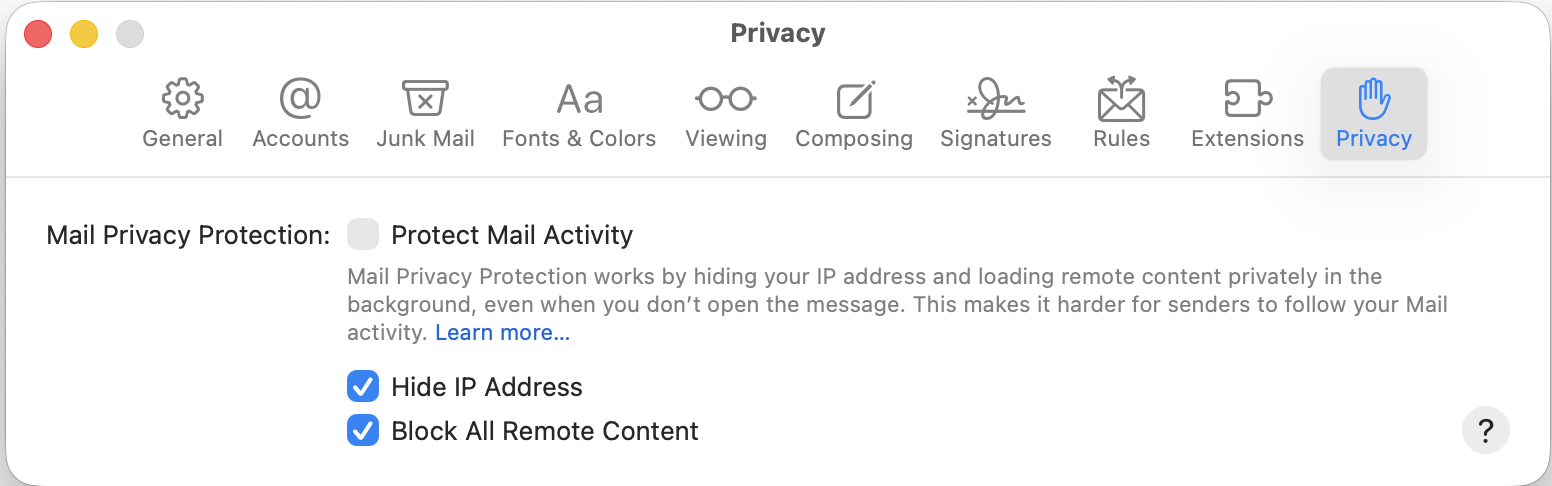
I would also suggest that use a Setting in Mail that might stop the emails asking for Passwords. Delete the emails that are asking for a password.
Go to Settings>Privacy (See Screenshot) and use the two setting that are check off on the screenshot.