There are two methods, although they work in different ways:
- untick (un-check) a song in your library. If the setting to Sync only ticked songs and videos is still on (that's the default), any unticked song will be removed from the iPod at the next Sync. Be aware that this will prevent the unticked songs from being played in sequence in iTunes. To play an unticked song in iTunes, you need to specifically select it
- Use Sync Selected playlists, artists, albums and genres to manage your iPod. (This is the better option)
- connect the iPod to your computer and select the iPod icon that appears at the top of the iTunes window:
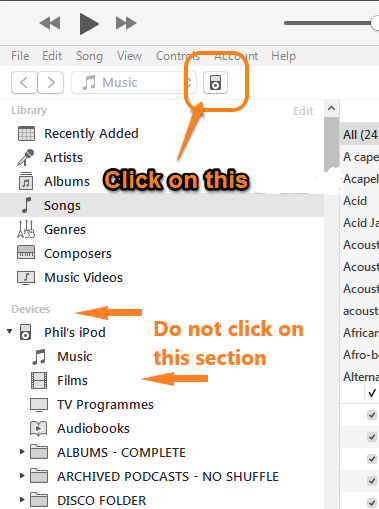
Now use the screenshot below as your guide:
- switch from the Device/Settings/Summary panel (1.) to the Device/Settings/Music panel:

- ensure that the Sync Music option (2.) is selected (there should be a tick, or checkmark, in the box)
- in the following step (3.), choose the Selected playlists, artists, albums and genres option (3.). This will then display the sections numbered 4.
- choose the items that you want on your iPod from the various lists in sections numbered 4. (i.e. Albums, Artists, Playlists and Genres)
- tap the Sync (or Apply) button in the lower right corner of the iTunes window (not shown in the screenshot)
That's it. Future Syncs will, use the options that you set.