How can I stop my iPod Touch from syncing all songs when connected to iTunes?

Since the new iTunes "upgrade" when ever I connect my IPOD Touch *all* songs are synced. I this would be OK but I have 3000 plus songs.


[Re-Titled by Moderator]

iPod, iOS 15

Posted on Jan 11, 2025 8:03 AM

Reply
Question marked as Top-ranking reply

Posted on Feb 19, 2025 4:20 AM

There are two methods, although they work in different ways:


  1. untick (un-check) a song in your library. If the setting to Sync only ticked songs and videos is still on (that's the default), any unticked song will be removed from the iPod at the next Sync. Be aware that this will prevent the unticked songs from being played in sequence in iTunes. To play an unticked song in iTunes, you need to specifically select it
  2. Use Sync Selected playlists, artists, albums and genres to manage your iPod. (This is the better option)
    • connect the iPod to your computer and select the iPod icon that appears at the top of the iTunes window:
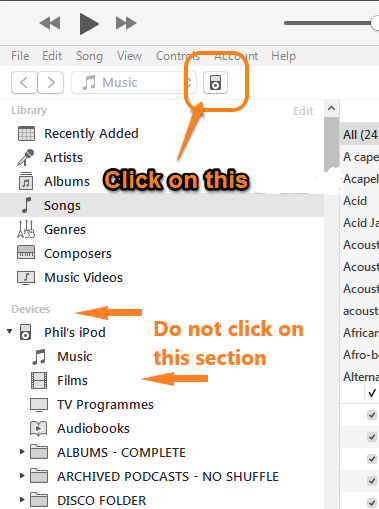

Now use the screenshot below as your guide:


  • switch from the Device/Settings/Summary panel (1.) to the Device/Settings/Music panel:

  • ensure that the Sync Music option (2.) is selected (there should be a tick, or checkmark, in the box)
  • in the following step (3.), choose the Selected playlists, artists, albums and genres option (3.). This will then display the sections numbered 4.
  • choose the items that you want on your iPod from the various lists in sections numbered 4. (i.e. Albums, Artists, Playlists and Genres)
  • tap the Sync (or Apply) button in the lower right corner of the iTunes window (not shown in the screenshot)


That's it. Future Syncs will, use the options that you set.

1 reply
Question marked as Top-ranking reply

Feb 19, 2025 4:20 AM in response to TTfool78

There are two methods, although they work in different ways:


  1. untick (un-check) a song in your library. If the setting to Sync only ticked songs and videos is still on (that's the default), any unticked song will be removed from the iPod at the next Sync. Be aware that this will prevent the unticked songs from being played in sequence in iTunes. To play an unticked song in iTunes, you need to specifically select it
  2. Use Sync Selected playlists, artists, albums and genres to manage your iPod. (This is the better option)
    • connect the iPod to your computer and select the iPod icon that appears at the top of the iTunes window:


Now use the screenshot below as your guide:


  • switch from the Device/Settings/Summary panel (1.) to the Device/Settings/Music panel:

  • ensure that the Sync Music option (2.) is selected (there should be a tick, or checkmark, in the box)
  • in the following step (3.), choose the Selected playlists, artists, albums and genres option (3.). This will then display the sections numbered 4.
  • choose the items that you want on your iPod from the various lists in sections numbered 4. (i.e. Albums, Artists, Playlists and Genres)
  • tap the Sync (or Apply) button in the lower right corner of the iTunes window (not shown in the screenshot)


That's it. Future Syncs will, use the options that you set.

This thread has been closed by the system or the community team. You may vote for any posts you find helpful, or search the Community for additional answers.

How can I stop my iPod Touch from syncing all songs when connected to iTunes?

Welcome to Apple Support Community
A forum where Apple customers help each other with their products. Get started with your Apple Account.