Slo Mo on video

I shot several auditions/videos on my phone this morning only to discover upon watching them that 30 seconds in the video goes into slow motion. Can I correct them? and how do I prevent this from happening again?


Thanks in advance.

MacBook Pro 13″, macOS 13.6

Posted on Jun 16, 2024 11:17 AM

Reply
Question marked as Top-ranking reply

Posted on Jun 17, 2024 12:38 AM

The timeline for such high frame rate video (120/240 fps) should have extra controls to set which part of the video should get a slo-mo effect. You can set that to none (by having the start and stop of the effect together). Other player software or conversion software will likely not know what to do with the slow-mo settings and ignore it. Exporting from QuickTime Player would lock the effect through conversion to a fixed lower frame rate throughout the video.


and how do I prevent this from happening again?

Be sure that the Camera app isn’t set to “sʟᴏ-ᴍᴏ” mode accidentally.

Watch the left-right swipeable Mode options directly above the record button.

I don’t think that there is an option to disable this mode option altogether.


iPhone camera basics - Apple Support

Record videos with your iPhone camera - Apple Support

Adjust slow motion on iPhone - Apple Support

Adjust slow motion in QuickTime Player on Mac - Apple Support
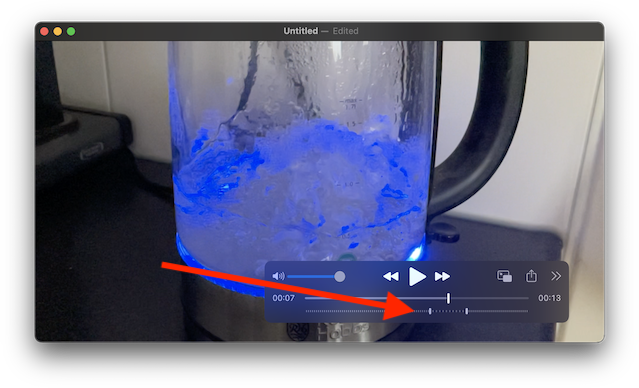
(glass kettle with blue LED, at the boiling point)

Similar questions

1 reply
Question marked as Top-ranking reply

Jun 17, 2024 12:38 AM in response to PegWiesehan

The timeline for such high frame rate video (120/240 fps) should have extra controls to set which part of the video should get a slo-mo effect. You can set that to none (by having the start and stop of the effect together). Other player software or conversion software will likely not know what to do with the slow-mo settings and ignore it. Exporting from QuickTime Player would lock the effect through conversion to a fixed lower frame rate throughout the video.


and how do I prevent this from happening again?

Be sure that the Camera app isn’t set to “sʟᴏ-ᴍᴏ” mode accidentally.

Watch the left-right swipeable Mode options directly above the record button.

I don’t think that there is an option to disable this mode option altogether.


iPhone camera basics - Apple Support

Record videos with your iPhone camera - Apple Support

Adjust slow motion on iPhone - Apple Support

Adjust slow motion in QuickTime Player on Mac - Apple Support

(glass kettle with blue LED, at the boiling point)

This thread has been closed by the system or the community team. You may vote for any posts you find helpful, or search the Community for additional answers.

Slo Mo on video

Welcome to Apple Support Community
A forum where Apple customers help each other with their products. Get started with your Apple Account.