My contacts, photos, passwords show up on my daughters phone

My daughter was grounded from her phone. I logged into her iCloud on my phone. I signed out of it and into mine but somehow the parental controls screentime settings apply to me also and I can’t turn it off. Now after signing back into my phone with my info, she has my pictures on her phone as well as contacts, passwords and whatever else I havnt realized yet. How do I fix this please? I factory reset mine and nothing changed. It went right back to how it was.

iPhone 14 Pro, iOS 17

Posted on Aug 1, 2023 6:22 AM

Reply

Similar questions

4 replies

Aug 1, 2023 6:30 AM in response to kalanall3

You should pay attention to two commonly overlooked aspects...


  1. Configuring device restrictions for your child's device.
  2. Setting up a screen time passcode on your own device for your child.



Set Screen Time Restrictions for your Child in your Family using Parental Control.


Please see the pic below which is self-explanatory.
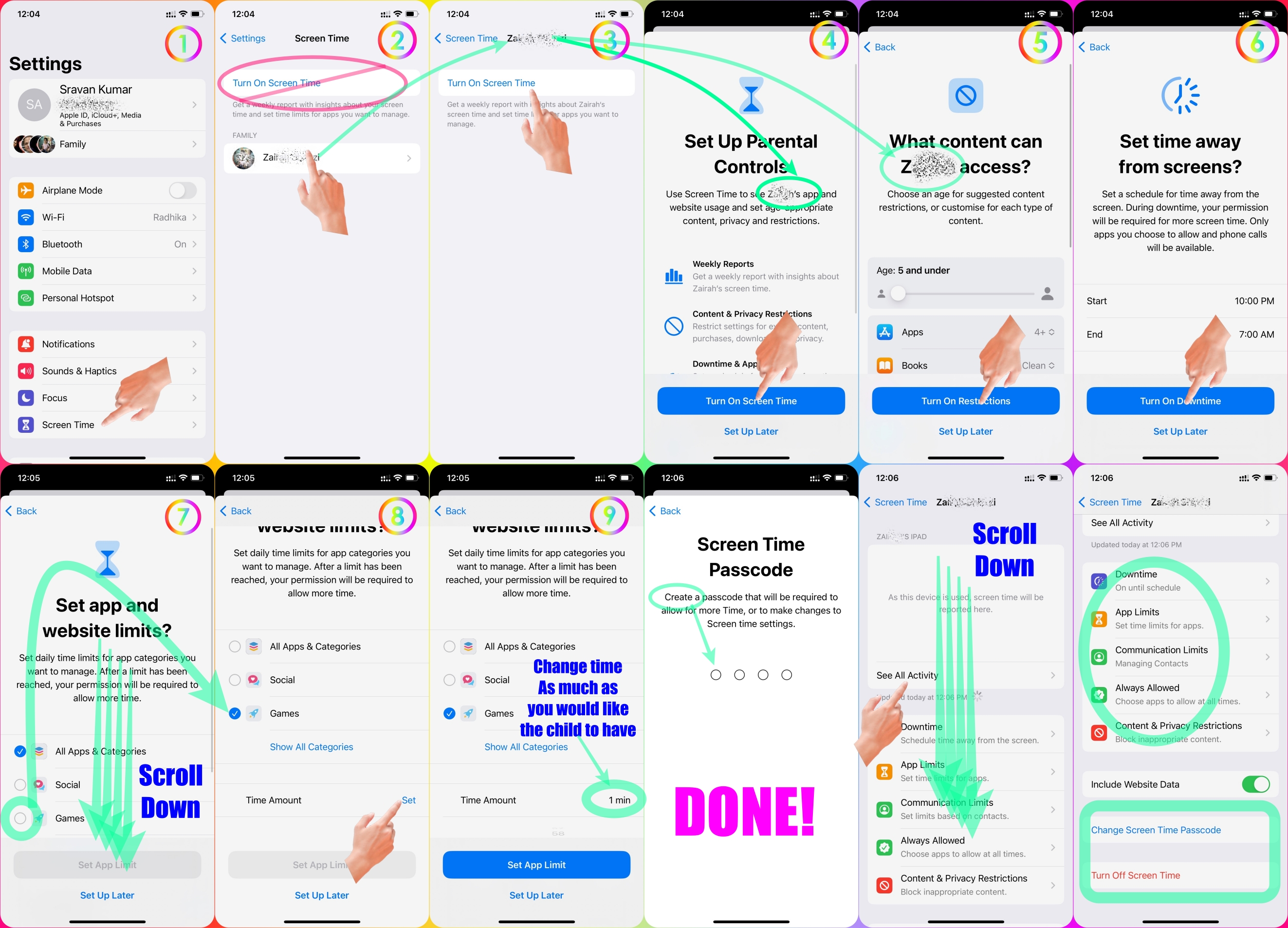


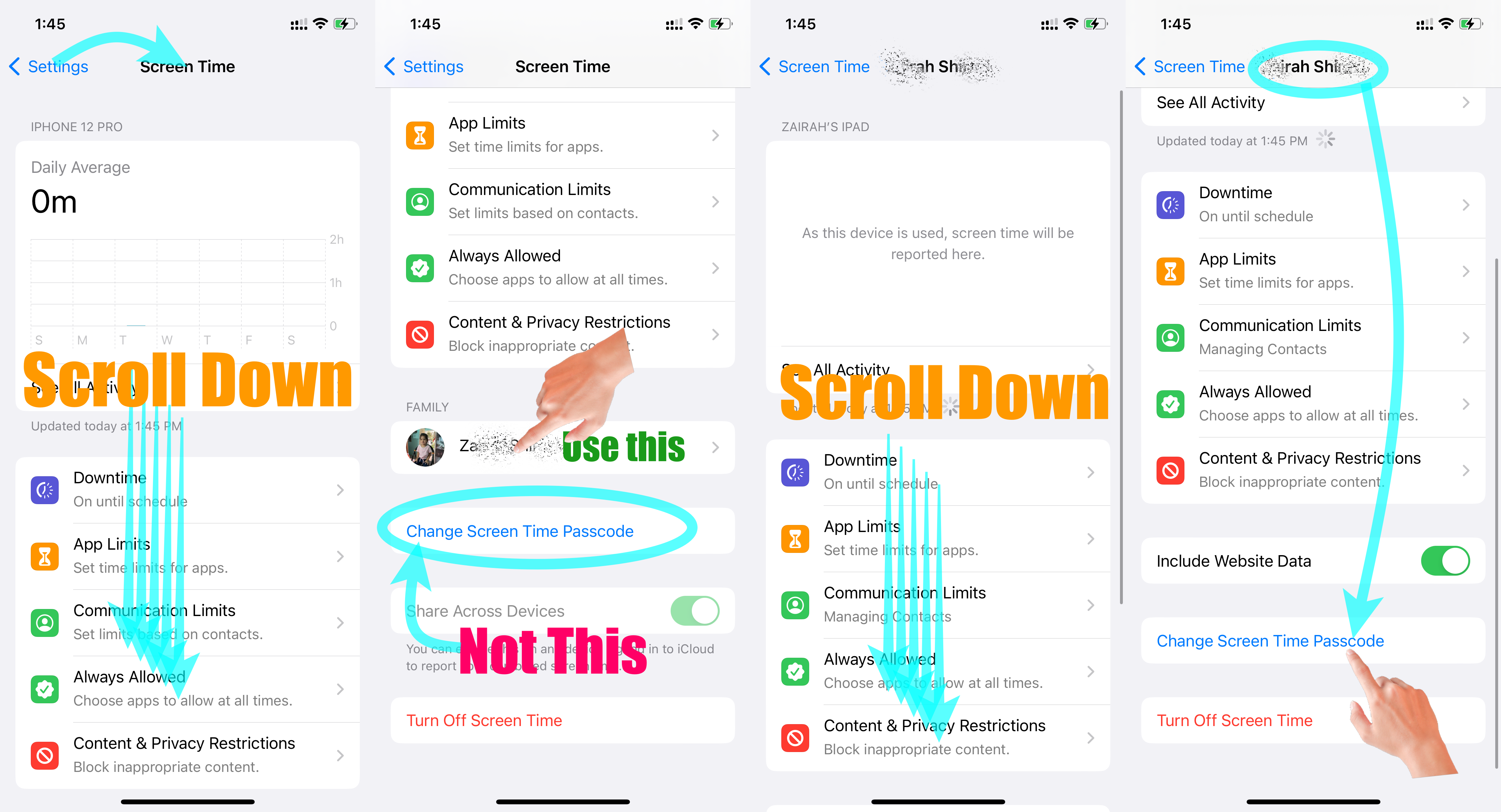
Set Screen Time Passcode for your child's device through your device.


Please see the pic below which is self-explanatory.


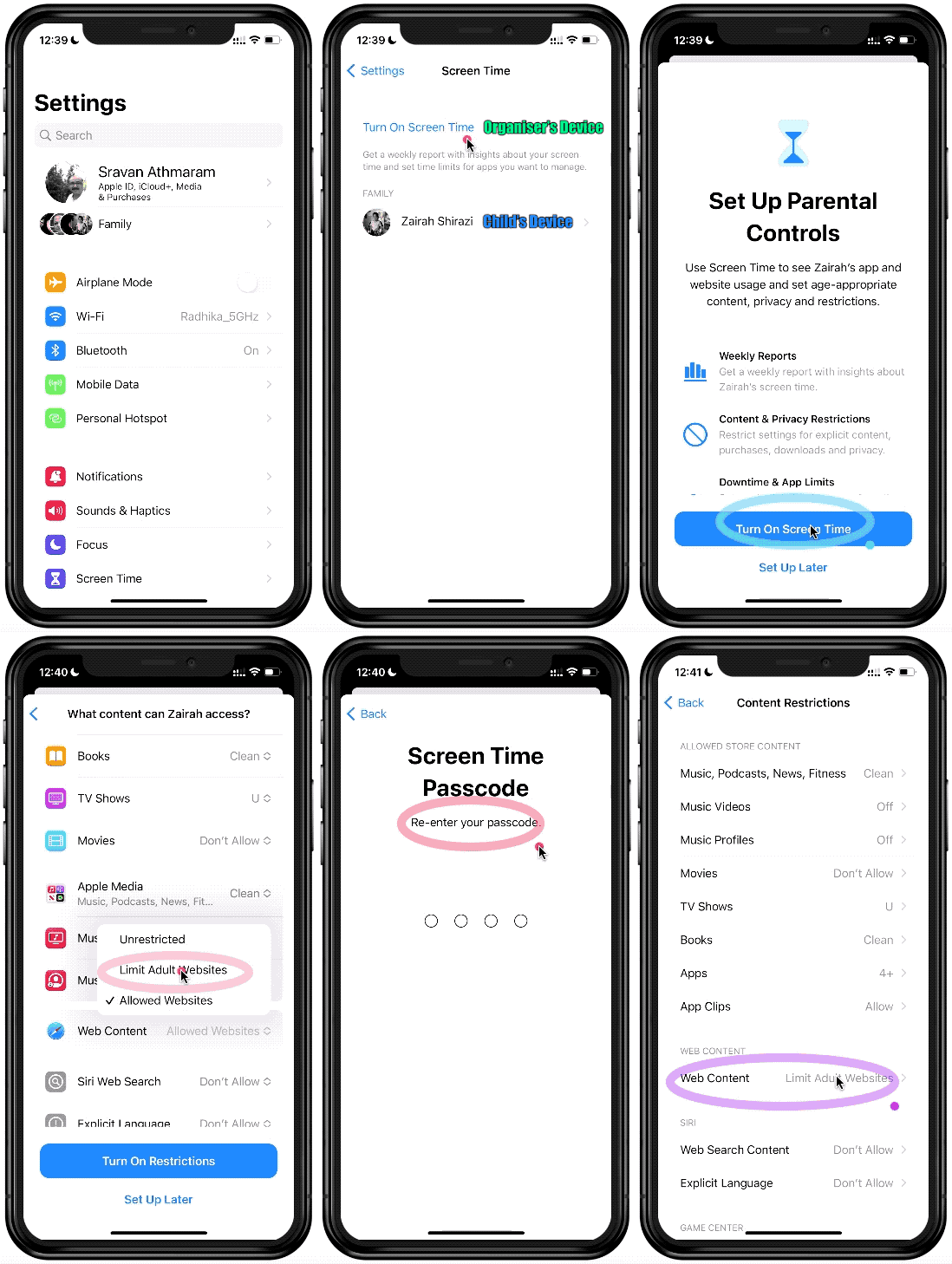
This GIF below will depict how to set Screen Time Restrictions for your Child's Device


  1. Add your Child as a Family Member
  2. Then Start Screen Time on your Device.
  3. Now watch the GIF below


Go to Settings and tap Screen Time. Tap Content & Privacy Restrictions and enter your Screen Time passcode. Tap Content Restrictions, then tap Web Content. Choose Unrestricted Access, Limit Adult Websites, or Allowed Websites Only.


Use parental controls on your child's iPhone, iPad, and iPod ...


Set up parental controls with Family Sharing on iPhone

  1. Go to Settings > [your name] > Family Sharing > Screen Time.
  2. Tap the name of a child in your family group, tap Turn On Screen Time, then follow the onscreen instructions.


Set up parental controls with Family Sharing on iPhone


Aug 1, 2023 6:40 AM in response to kalanall3

Hello Kalanall, you are experiencing this because you are possibly now sharing the same cloud with your daughter, so some of your information available on your cloud would appear on her phone, you can apply any of these options and see if the problem will be resolved;


  1. Delete your files on her phone and turn off iCloud sync.
  2. You may have to erase your device on the iCloud website.


Aug 1, 2023 6:46 AM in response to kalanall3

Hello,


Your appear to have two issues. One is your data transfer and the other Screen Time..


When you sign into an account on a device that was signed into a different account earlier, the device asks you if you wish to keep the information from the old account and mix it with the new account. You must have said "yes" and this has resulted in your information being merged with her information on her account. Since this information is then stored in iCloud, it appears on her phone signed into her account.


Screen Time settings are on an account, so I am not clear how her settings transferred to you since you are now signed into your account. However I do not use Screen Time so I don't know if somehow it transferred in a similar manner to the way your data transferred to her.


As for the data, you will have to ask her to delete that from her account. In theory if you had wanted to do what you did you would ideally have erased your phone completely before signing into her account, and then again before signing back into yours. You cannot casually sign out of one account on iPhones or iPads and into another.


Have you tried using your information to remove the Screen Time settings? See Use Screen Time on your iPhone, iPad, or iPod touch - Apple Support If it doesn't work, read this support article about how to remove a forgotten Screen Time passcode If you forgot your Screen Time passcode - Apple Support


This thread has been closed by the system or the community team. You may vote for any posts you find helpful, or search the Community for additional answers.

My contacts, photos, passwords show up on my daughters phone

Welcome to Apple Support Community
A forum where Apple customers help each other with their products. Get started with your Apple Account.