Hello. I am paying for 50g icloud but my phone memory is still occupied. What do i have to do to freeup storage space o my phone

Hello. I am paying for 50g i-cloud but my phone memory is still occupied. What do i have to do to free up storage space on my phone

iPhone 6s, iOS 13

Posted on Apr 28, 2020 8:08 AM

Reply
Question marked as Top-ranking reply

Posted on Apr 28, 2020 5:45 PM

iCloud mirrors what is on your phone; it isn’t a way to move stuff off your phone, because it syncs all additions, deletions and changes. The purpose of iCloud is to sync multiple devices, so if you have, say, an iPhone, an iPad and a computer it will assure that exactly the same content is on all of the devices.


If you want to free up space on your phone you need to use an archiving service such as Google Photos, Dropbox, box.com, Microsoft Onedrive, etc, to move stuff off your phone (which also moves it out of iCloud).

12 replies
Question marked as Top-ranking reply

Apr 28, 2020 5:45 PM in response to yemi80

iCloud mirrors what is on your phone; it isn’t a way to move stuff off your phone, because it syncs all additions, deletions and changes. The purpose of iCloud is to sync multiple devices, so if you have, say, an iPhone, an iPad and a computer it will assure that exactly the same content is on all of the devices.


If you want to free up space on your phone you need to use an archiving service such as Google Photos, Dropbox, box.com, Microsoft Onedrive, etc, to move stuff off your phone (which also moves it out of iCloud).

Apr 28, 2020 5:50 PM in response to yemi80

See the "Content categories" section in:

How to check the storage on your iPhone, iPad, and iPod touch - Apple Support


The "Other" category are non-removable mobile assets, like Siri voices, fonts, dictionaries, non-removable logs and caches, Spotlight index, and system data, such as Keychain and CloudKit Database. Cached files can't be deleted by the system.


A very large "Other" (greater than about 10 GB) is usually an indication that something is corrupt. About all you can do is restore the iPhone from a backup or even more drastically restore it as new (which loses all your data).

Restore your iPhone, iPad, or iPod touch from a backup - Apple Support

Restore your iPhone, iPad, or iPod to factory settings - Apple Support


Apr 28, 2020 11:35 AM in response to yemi80

Have you tried optimising storage through iCloud. That will save lots of space on iPhone.


Store your photos and videos in iCloud

Your photos and videos are stored on your device in their original, high-resolution version. This means that they use a lot of space on your iPhone, iPad, and iPod touch. With iCloud Photos, you can make more space available on your device and have your entire collection, everywhere you go.

Get started with iCloud Photos:

  1. Tap Settings > [your name] > iCloud > Photos.
  2. Turn on iCloud Photos.
  3. Select Optimize iPhone Storage to save space on your device.
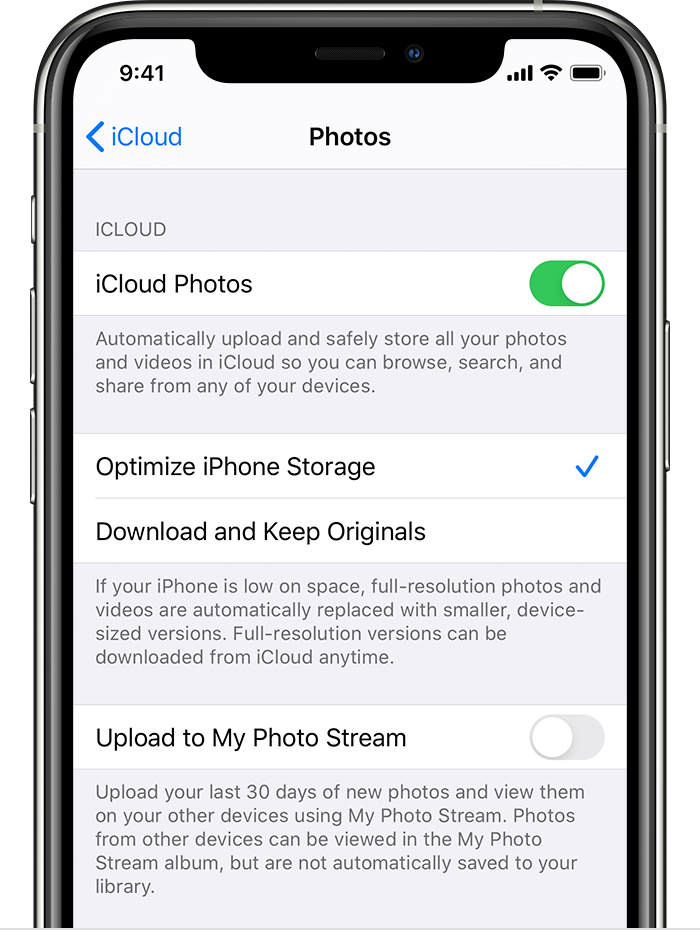
With Optimize Storage, smaller, space-saving photos and videos are kept on your device while all of your original, full-resolution versions are stored in iCloud. And as long as you have enough space in iCloud, you can store as many photos and videos as you want.




Apr 29, 2020 9:16 AM in response to Lawrence Finch

Hi. Thank you for your response.


I’m currently uploading my files to google photos. I’ll probably do a factory reset afterwards as my phone upgrade is still a future plan and cancel my iCloud subscription as I have only 1 apple device.

I’ll also read more on how to use google photos to move files out of my phone.


Thank you for your time.

This thread has been closed by the system or the community team. You may vote for any posts you find helpful, or search the Community for additional answers.

Hello. I am paying for 50g icloud but my phone memory is still occupied. What do i have to do to freeup storage space o my phone

Welcome to Apple Support Community
A forum where Apple customers help each other with their products. Get started with your Apple Account.
