Remove 'https://' from URLs in Numbers column

Sequoia 15.7.2 in Numbers I am not able to edit the url/s that I have listed in a column. My list of addresses begin with https:// That is what I want to delete in every row. I would like to change all at once but will do one by one if I need to.

iMac (2017 – 2020)

Posted on Dec 9, 2025 3:00 PM

Reply
Question marked as Top-ranking reply

Posted on Dec 10, 2025 10:13 AM

It isn't quite clear what you're trying to. Are you saying you have something like:
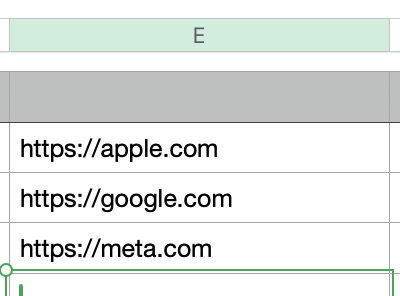


and you want:
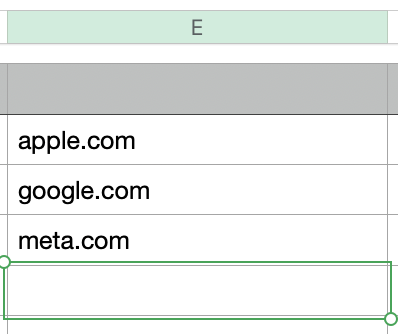


If you want to change 'in place', then a simple Find and Replace will do the job. Edit -> Find...:
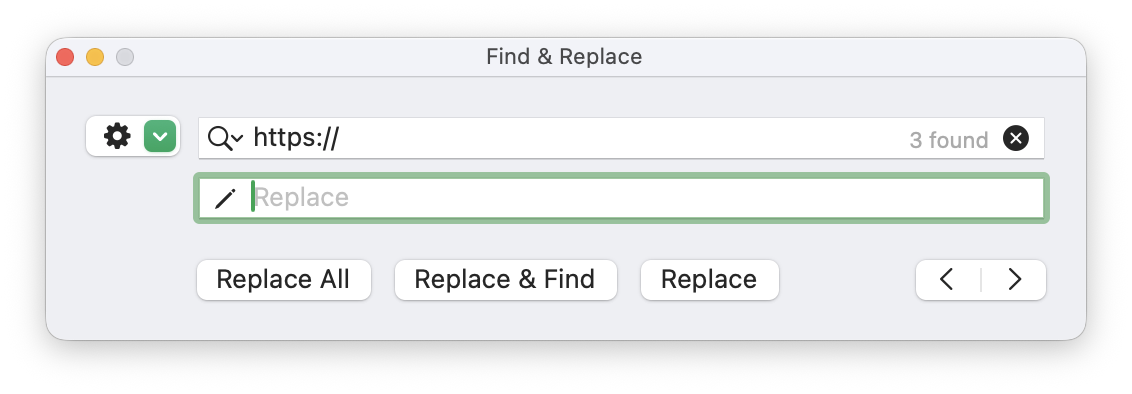


This will replace all occurrences of 'https://' with an empty string.


If you want to retain the original URL and just extract the hostname and/or path from the URL, then you need an adjacent column with some text functions to strip the protocol:
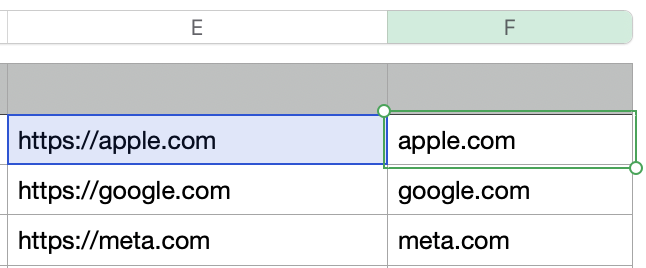


Formula in F2 is:


=TEXTAFTER(E2,"https://",1)


which returns all the text after 'https://' (note this may be more complicated with more complex URLs, but I can't see what you're working with.


1 reply
Question marked as Top-ranking reply

Dec 10, 2025 10:13 AM in response to jimfrommartinez

It isn't quite clear what you're trying to. Are you saying you have something like:


and you want:


If you want to change 'in place', then a simple Find and Replace will do the job. Edit -> Find...:


This will replace all occurrences of 'https://' with an empty string.


If you want to retain the original URL and just extract the hostname and/or path from the URL, then you need an adjacent column with some text functions to strip the protocol:


Formula in F2 is:


=TEXTAFTER(E2,"https://",1)


which returns all the text after 'https://' (note this may be more complicated with more complex URLs, but I can't see what you're working with.

Remove 'https://' from URLs in Numbers column

Welcome to Apple Support Community
A forum where Apple customers help each other with their products. Get started with your Apple Account.