Hard Drive reorders photos after manual sorting

Hi, ive just put all my photos on a Hard Drive, the order of all my photos has been changed, they are in separate folders so I spent 4 hrs yesterday putting them back in order, today I went to carry on and it has reverted to the original layout, how do I stop the computer overriding my photo order? TIA Geoff

MacBook Pro 15″, macOS 12.7

Posted on Nov 29, 2025 3:17 AM

Reply
16 replies

Nov 29, 2025 6:15 AM in response to How2024

I'm not sure what you're doing, exactly. Do you have your pictures showing in the Photos app? By folders do you mean albums? Generally I don't have problems with keeping albums in a custom order, but since accidents happen, I usually take steps so that the order is one that can be sorted-- by changing dates or titles of pictures. I'm not sure what "original layout" means. External Hard Drives behave the same as the internal one.


Are you, in fact, using macOS 12.7 Monterey?

Dec 1, 2025 7:21 AM in response to How2024

This is the Community of users for the Photos app, and you haven't mentioned that, so that's why I'm confused, as well.


Is Tim 1 the filename, like "Tim 1.jpg?" Or is it a title in Photos?


As I said earlier, if your pictures are in a Finder folder, you can choose View>Sort, like this:
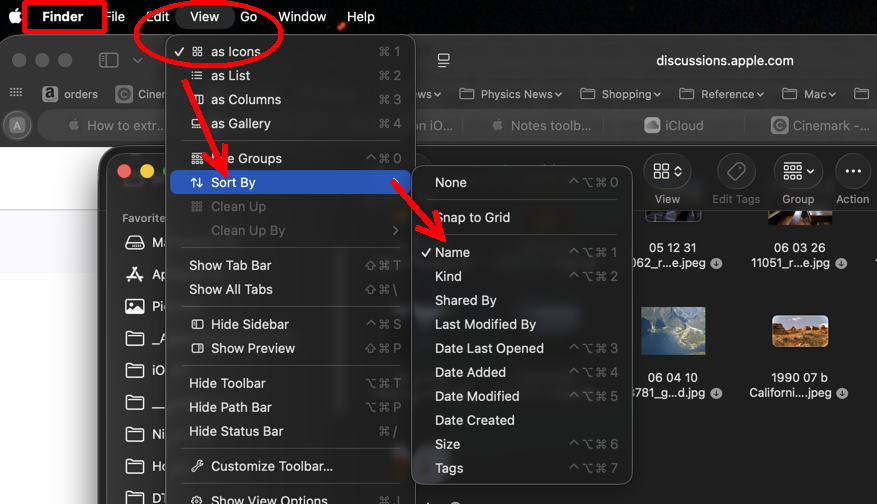
"Sort by None," meaning you move them to the order you want, is not available in List view.


In Photos, I usually sort by Title:
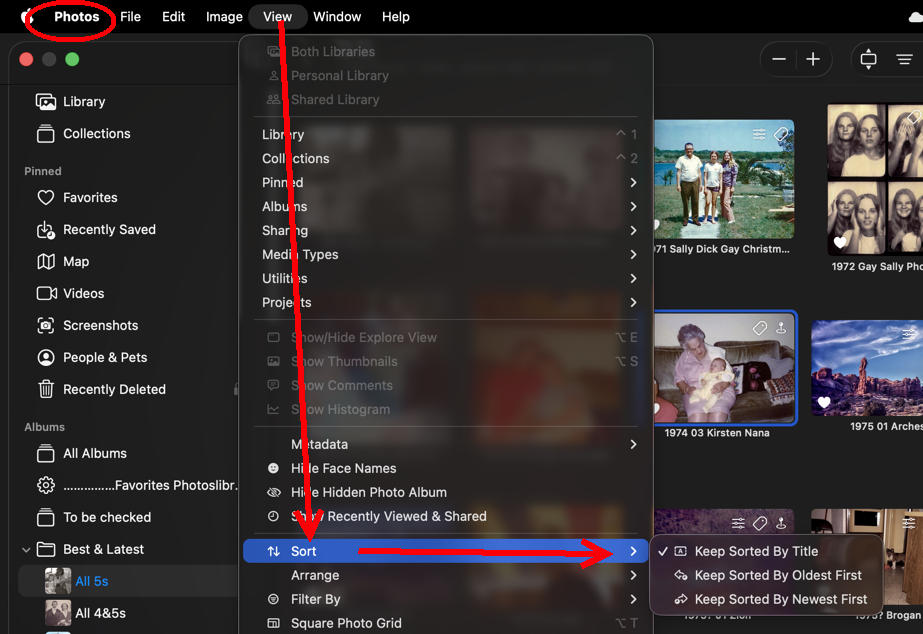
In a Photos Album (but not in other views) you can move the pictures to a custom order, and then none of the choices above will have a check.


The external drive does not manipulate your pictures; apps do. You haven't said what app you're using. Again, are you using Photos or Finder or some other app?


If you don't know, then you could include a screenshot to help Old Toad and me to figure out what you mean.



Dec 1, 2025 2:36 AM in response to How2024

Hi, I am so confused, my Album called Tim on my Mac has photos in it Tim 1 Tim 2 Tim 3 etc all in order 123 I move that Album to my HDD my photos are now Tim 6 Tim 4 Tim 2, I put them back in order I now have Tim 1 Tim 2 Tim 3 all in order in Album Tim, I close my MacHDD down I open it the next day and my HDD has reverted to Tim 6 Tim 4 Tim 2 etc how do I stop my HDD from changing the order I want my photos in? If they are in the correct order on my Mac why can’t they keep that order? If your telling me I have to number every single photo I have thousands to do, again thanks if I haven’t explained it very well then can you give me a step by step procedure to guarantee the order of my photos when I transfer them. TIA

Dec 2, 2025 8:34 AM in response to How2024

How2024 wrote: …I didn’t use the view box, hopefully problem sorted now thanks again

That's great! If you have more questions, it is very important that you tell people what app you are using. I still don't know if you meant "View" in Finder or in Photos. The name of the app is in the upper right hand corner. Right now I'm using the Safari app, and it says that on the screen:


That's important information for troubleshooting.

Hard Drive reorders photos after manual sorting

Welcome to Apple Support Community
A forum where Apple customers help each other with their products. Get started with your Apple Account.