how to get rid of the "downloading messages" progress bar which zips back and forth in Mac mail in Tahoe?

how to get rid of the "downloading messages" progress bar which zips back and forth in Mac mail in Tahoe?


It's present nearly all of the time, as I have four separate accounts in Mac Mail and receive probably 500 emails per day across those accounts. So the constant blue progress bar moving back back-and-forth is super distracting.


MacBook Pro 14″

Posted on Oct 28, 2025 10:16 AM

Reply
Question marked as Top-ranking reply

Posted on Oct 28, 2025 10:42 AM

It's checking for mail. You can change the frequency at which that happens in Mail menu > Settings > General tab. Less frequent checking means fewer distractions, but of course it also means you won't get new messages as soon as they're available.


10 replies

Oct 28, 2025 10:31 AM in response to erikselz

erikselz wrote:

how to get rid of the "downloading messages" progress bar which zips back and forth in Mac mail in Tahoe?

It's present nearly all of the time, as I have four separate accounts in Mac Mail and receive probably 500 emails per day across those accounts. So the constant blue progress bar moving back back-and-forth is super distracting.


https://discussions.apple.com/content/attachment/e4a3ce8b-f043-45c7-b881-3786619ec390
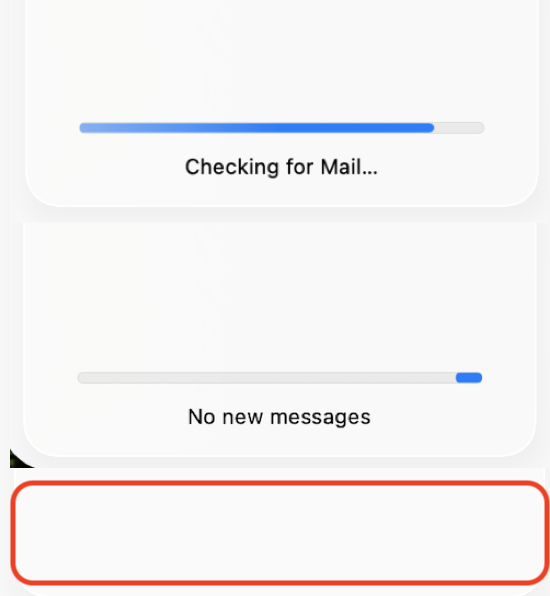


How is this an issue— it is looking for or fetching mail. You can quit the Mail.app if you do not want to use it.


Get on a faster Network if your download speed is suspect...


Quit Mail and relaunch it...


Delete the mail account and add it back in... and compare your results.

Remove or temporarily turn off email accounts in Mail on Mac


You can hide the sidebar:


The current stable release of Tahoe including bug fixes, security updates is macOS 26.0.1

Keep your Mac up to date - Apple Support

Keep your Mac up to date - Apple Support


To be proactive you can submit your Apple Feedback direct to the Product Team here:

Feedback - Mail - Apple



Oct 28, 2025 11:35 AM in response to erikselz

You do anything in the Mail.app the progress bar is going to represent the progress...


Download/transfer/ Delete a messages or delete a 100 messages for example...


This is not limited to downloading new messages.


If you have an ongoing issues with the server— recommendations made above to address some larger issues with your mail server downloading.


or the work-a-rounds, or send your feedback for some user option to over ride the progress bar


Nov 5, 2025 9:51 AM in response to erikselz

I'm with you, it's awful. I don't need to know if Mac Mail is moving/deleting emails or fetching new ones, it's always done that but I never needed to know about it.


I'm trying to concentrate on reading emails and the constant flashing at the bottom of the screen is so distracting. I can only assume that the people that don't have an issue with it don't get hundreds of emails every day! It's non stop.

how to get rid of the "downloading messages" progress bar which zips back and forth in Mac mail in Tahoe?

Welcome to Apple Support Community
A forum where Apple customers help each other with their products. Get started with your Apple Account.

