Recommended Solution: Delete and Re-add the Account
The easiest and most reliable way to resolve this is to completely delete the Comcast account from Mac Mail and then add it back as a Yahoo account.
- Remove the Old Account:
- Open Mail on your Mac.
- Go to Mail > Settings (or Preferences in older macOS versions).
- Click on Accounts.
- Select your @comcast.net account.
- Click the minus sign (-) at the bottom of the account list to remove the account. Confirm that you want to delete it. (Note: This does not delete your emails; they are stored on the Yahoo server, but it's always a good idea to confirm you can access your email via the Yahoo webmail before doing this.)
Add the Account as Yahoo:
- In the Accounts window, click the plus sign (+) to add a new account.
- Choose the Yahoo! option from the list of providers.
- Enter your full @comcast.net email address and your password.
- Mac Mail should now attempt to automatically configure the account using the correct Yahoo Mail server settings.
If the Simple Re-add Fails: Check for Two-Factor Authentication (App Password)
If your Yahoo/Comcast email account has Two-Factor Authentication (2FA) enabled, you will not be able to log in to Mac Mail using your regular password. You will need to generate a special "App Password" from your Yahoo security settings.
- Log in to your Yahoo Mail Security Settings (you can search Google for "Yahoo Mail App Password").
- Follow the instructions to generate a new App Password for Mac Mail.
- When you add the account back to Mac Mail (Step 2 above), use this newly generated App Password instead of your regular password.
It sounds like you're experiencing a common issue after Comcast (Xfinity) has migrated your email service to Yahoo Mail. While you keep your @comcast.net email address, the underlying service and server settings have changed, which usually breaks the connection in third-party email clients like Mac Mail.
Here are the primary issues and the typical fix:
The Main Issue: Incorrect Server Settings
Once your account is moved to Yahoo Mail, your Mac Mail app is still trying to use the old Comcast server settings. To fix this, you need to update the account settings in Mac Mail.
Recommended Solution: Delete and Re-add the Account
The easiest and most reliable way to resolve this is to completely delete the Comcast account from Mac Mail and then add it back as a Yahoo account.
- Remove the Old Account:
- Open Mail on your Mac.
- Go to Mail > Settings (or Preferences in older macOS versions).
- Click on Accounts.
- Select your @comcast.net account.
- Click the minus sign (-) at the bottom of the account list to remove the account. Confirm that you want to delete it. (Note: This does not delete your emails; they are stored on the Yahoo server, but it's always a good idea to confirm you can access your email via the Yahoo webmail before doing this.)
- Add the Account as Yahoo:
- In the Accounts window, click the plus sign (+) to add a new account.2
Choose the Yahoo! option from the list of providers.
Enter your full @comcast.net email address and your password.
Mac Mail should now attempt to automatically configure the account using the correct Yahoo Mail server settings.
If the Simple Re-add Fails: Check for Two-Factor Authentication (App Password)
If your Yahoo/Comcast email account has Two-Factor Authentication (2FA) enabled, you will not be able to log in to Mac Mail using your regular password. You will need to generate a special "App Password" from your Yahoo security settings.
- Log in to your Yahoo Mail Security Settings (you can search Google for "Yahoo Mail App Password").
- Follow the instructions to generate a new App Password for Mac Mail.
- When you add the account back to Mac Mail (Step 2 above), use this newly generated App Password instead of your regular password.
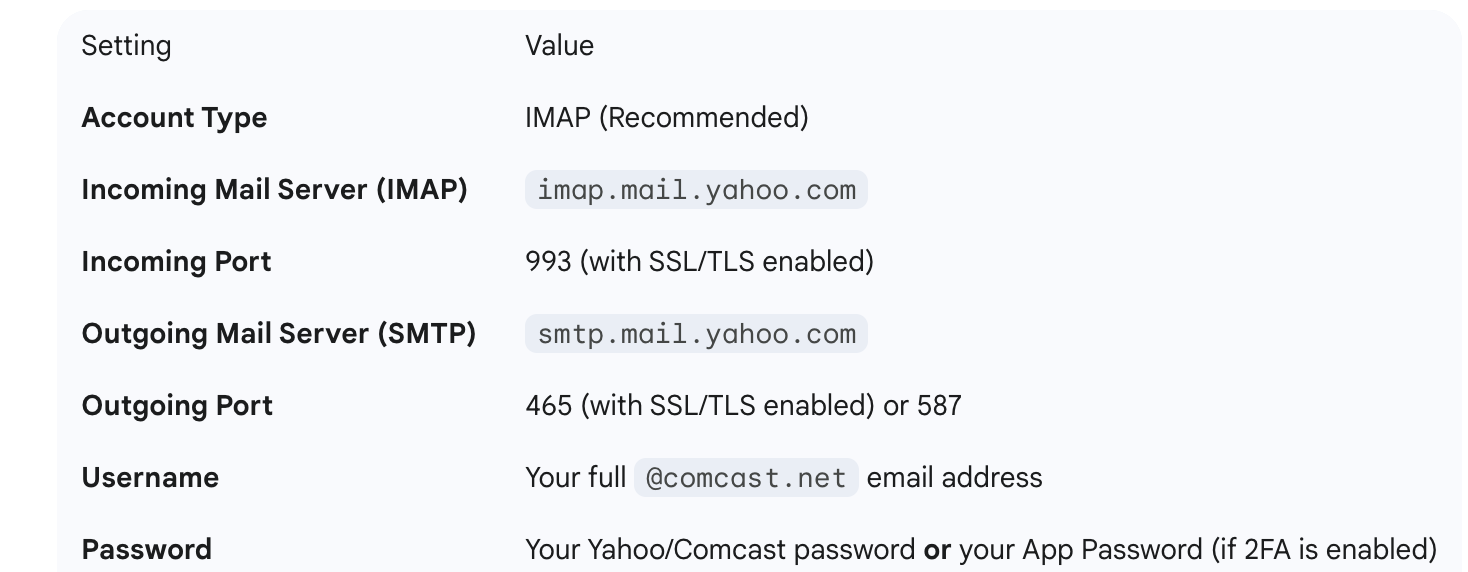
Backup Fix: Manually Configure IMAP/SMTP Settings (If all else fails)
If the automatic setup fails, you might need to manually input the Yahoo server settings. You would typically select "Other Mail Account" and use these settings (though your @comcast.net address will be handled by Yahoo's servers):