Read receipts not working for iMessage on iPhone

No "read" notification any more from senders on my phone, but another phone always says "read" from the same user. I have read receipts ON and have toggled on and off, restarted, toggled on and off messages, nothing works.


[Re-Titled by Moderator]

Original Title: imessage problem

iPhone Air, iOS 26

Posted on Oct 20, 2025 12:33 PM

Reply
Question marked as Top-ranking reply

Posted on Oct 21, 2025 8:41 AM

On your phone go to Settings > Apps > Messages > RCS Messaging, and make sure it is turned on. Since it is a green bubble, it is not using iMessage for the Read Receipts, so relies on RCS for that feature. With RCS being a carrier feature, make sure there is not a carrier update for your phone. If you had dismissed a previous message to install the carrier update, you would need to install it manually and if one is available it will appear when going to the About settings seen below. Another feature at that setting is you can view Carrier setting there to see the version and tap it twice to reveal if if is showing RCS support or just Voice and SMS. Since your iPhone Air is using an eSIM, is your wife's phone using a physical SIM card out of curiosity?

Manually update your carrier settings on your iPhone or iPad - Apple Support


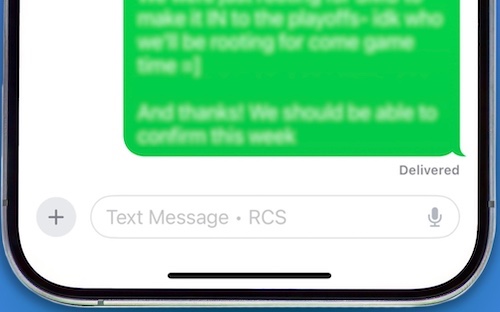
Also note in your screen shot the next message that is sent on that Phone is going to be SMS and not RCS, so the next one will not get a Read Receipt. In the text box, it will say Text Message - RCS when the message is sent as RCS like in the screenshot below.


If you are seeing RCS go in and out on either of your phones, then you will want to contact your carrier. If you have RCS messaging turned on and you never see the RCS in the Text Box with an Android user that has the feature turned on and you are showing RCS support, then contact Apple here. It is also worth testing with another Android user if you can to determine if the issue only appears for that one user.

Contact Apple Support - Apple Support


12 replies
Question marked as Top-ranking reply

Oct 21, 2025 8:41 AM in response to rjlsc2

On your phone go to Settings > Apps > Messages > RCS Messaging, and make sure it is turned on. Since it is a green bubble, it is not using iMessage for the Read Receipts, so relies on RCS for that feature. With RCS being a carrier feature, make sure there is not a carrier update for your phone. If you had dismissed a previous message to install the carrier update, you would need to install it manually and if one is available it will appear when going to the About settings seen below. Another feature at that setting is you can view Carrier setting there to see the version and tap it twice to reveal if if is showing RCS support or just Voice and SMS. Since your iPhone Air is using an eSIM, is your wife's phone using a physical SIM card out of curiosity?

Manually update your carrier settings on your iPhone or iPad - Apple Support


Also note in your screen shot the next message that is sent on that Phone is going to be SMS and not RCS, so the next one will not get a Read Receipt. In the text box, it will say Text Message - RCS when the message is sent as RCS like in the screenshot below.


If you are seeing RCS go in and out on either of your phones, then you will want to contact your carrier. If you have RCS messaging turned on and you never see the RCS in the Text Box with an Android user that has the feature turned on and you are showing RCS support, then contact Apple here. It is also worth testing with another Android user if you can to determine if the issue only appears for that one user.

Contact Apple Support - Apple Support


Oct 20, 2025 4:39 PM in response to rjlsc2

Review the information here from Apple:

  • When read receipts are turned on, the sender sees the word “Read” below messages they’ve sent to you, indicating that you’ve read their message. If you haven’t read their message, the sender sees “Delivered.”
  • You can’t turn on read receipts for anyone but yourself. To receive read receipts when your messages are opened, ask the recipient to turn them on.

Turn read receipts on or off in Messages on iPhone - Apple Support


Also read receipts are only available when both users are using iMessage. An Android phone does not use iMessage so when you send them a message, it will be a green bubble and you will not get a message showing the it was Delivered or Read and they will not know if a message has been read that was sent to you. That is how Read Receipts have always worked and there has been no change in iOS 26. I assume you are using the standard Apple Messages app and not a third party app such as Messenger or SnapChat.


Oct 20, 2025 1:21 PM in response to rjlsc2

rjlsc2 wrote:

No "read" notification any more from senders on my phone, but another phone always says "read" from the same user.

Is this person using iMessages (blue)? Or SMS/RCS (green)?

I have read receipts ON and have toggled on and off, restarted, toggled on and off messages, nothing works.

How you have Read Receipts set doesn't affect what you see on your phone. That only determines whether the people who send you messages see read receipts or not.

Oct 21, 2025 7:33 AM in response to rjlsc2

You will see "Read" if the sender has that feature enabled and if they are using iMessage or RCS. If, for some reason, the messages are now being sent as SMS, you won't see "Read." It appears, from that screenshot, that you have reverted to SMS. That could explain what you're seeing.


What is the difference between iMessage, RCS, and SMS/MMS? - Apple Support


Do you have an active data connection, either WiFi or cellular?


Green doesn't mean Android. It means someone who is not using iMessage. Not all iPhone users use iMessage. And you do not need to have Read enabled to see the indicator for people who do have it set.


See also:


Turn on RCS messaging on your iPhone - Apple Support

If you can't send or receive messages on your iPhone or iPad - Apple Support


Oct 21, 2025 8:40 AM in response to rjlsc2

rjlsc2 wrote:

I have known the message sender for twenty years, it’s an android phone.

I'm not saying they weren't an Android user. I was simply trying to add to your knowledge.

I never receive read receipts regardless of the settings on either phone. I have tested this on my wife’s iPhone to no avail.

Did you look at the troubleshooting guide I linked to?

This thread has been closed by the system or the community team. You may vote for any posts you find helpful, or search the Community for additional answers.

Read receipts not working for iMessage on iPhone

Welcome to Apple Support Community
A forum where Apple customers help each other with their products. Get started with your Apple Account.
