The most common fix is to verify and potentially re-enter the correct IMAP/SMTP server settings. Since your domain is part of the RoadRunner family, the server details typically point to the mail.twc.com server.
Recommended Troubleshooting Steps
- Verify Your Internet Connection: First, ensure your device has a stable Wi-Fi or cellular data connection by successfully loading a website in a browser.
- Verify/Update Mail Settings:
- Go to Settings > Mail > Accounts.
- Select your cfl.rr.com account.
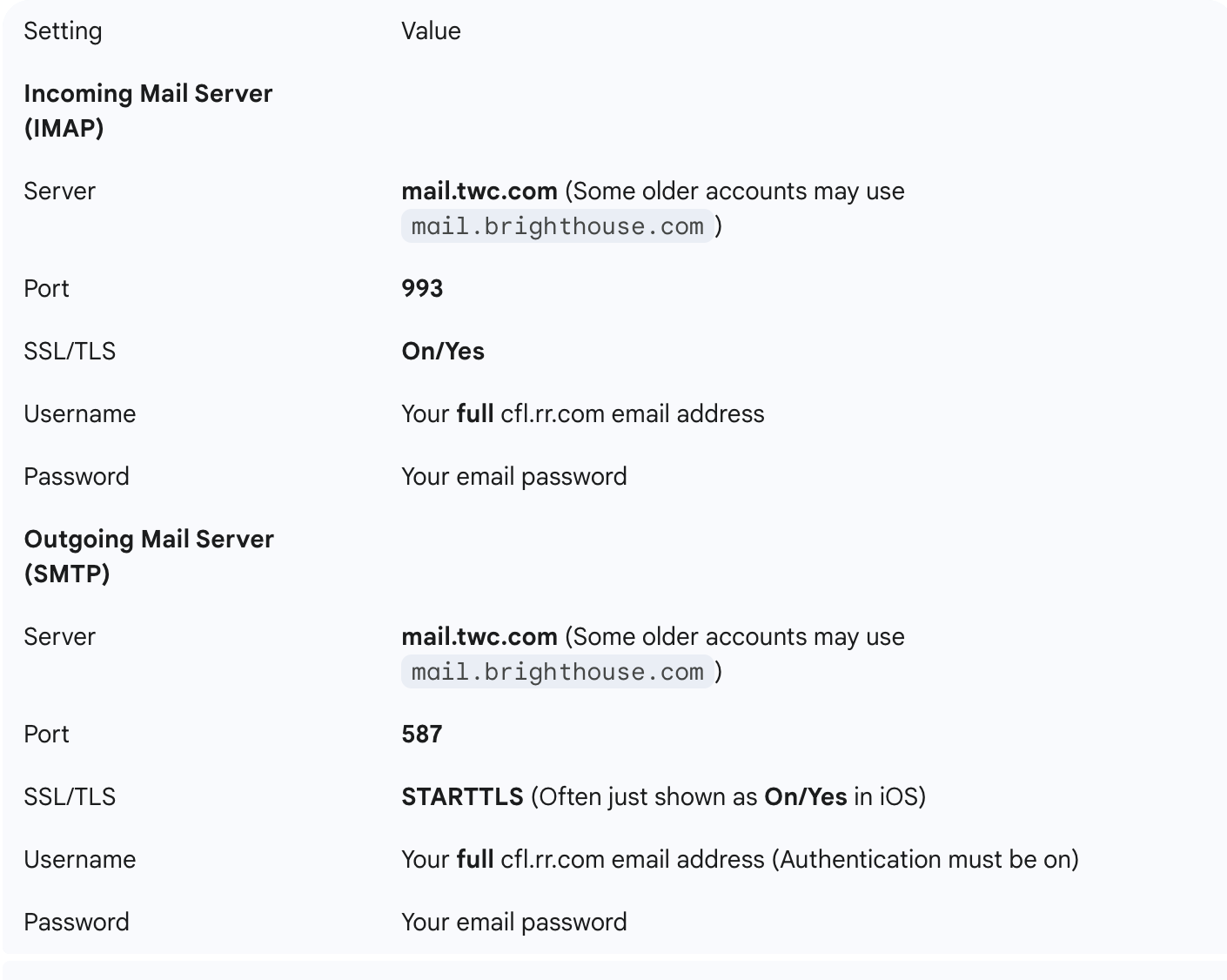
- Check and update the Incoming Mail Server (IMAP) and Outgoing Mail Server (SMTP) settings to match the following. You may need to delete and re-add the account entirely if you cannot edit the server fields.
Remove and Re-add the Account: If updating the settings doesn't work, delete the account from the Mail settings and then add it again as a new account, making sure to enter the correct server details above. This forces a fresh configuration.
- Settings > Mail > Accounts > Select your account > Delete Account.
- Settings > Mail > Accounts > Add Account > Other > Add Mail Account.
Restart Your Device: After any change, a full restart can clear minor software glitches.

