roll1234 wrote: …I have several photos libraries and am curious if there is a way of identifying the active in use library from within the actual program.
Sure. Go to Photos' Settings>General
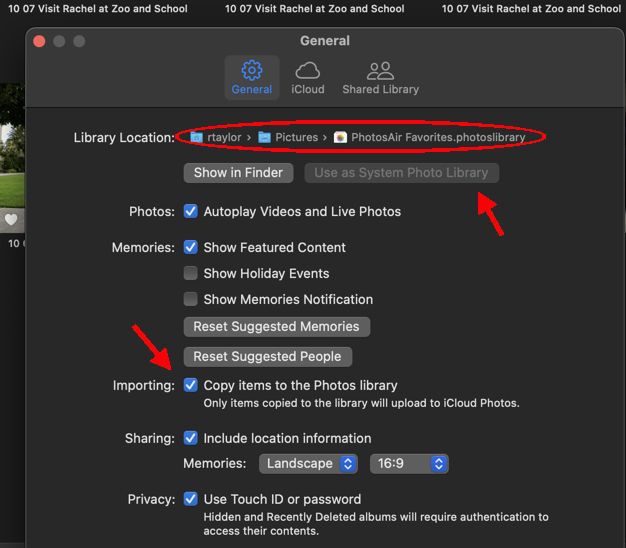
The path to the Library you're using is the first line.
I have oodles of pictures and so breaking the libraries down into smaller portions serves me well but occasionally I can't tell what library I'm in because many pictures are in more than one library.
My first item under "Albums" in the sidebar is a Smart Album with the name of the Library.
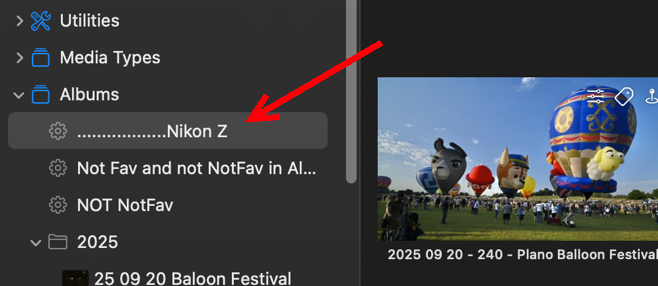
so that I can see immediately which Library I'm in. The Smart Album just shows all the pictures in the Library, and it's more versatile in sorting and such than the Library itself--but I don't really use it for much more than naming the Library. The leading dots just push the name out so it doesn't get lost.
By the way, if you have multiple Libraries, you would probably benefit a lot from using the trusted 3rd party app PowerPhotos ($40.) Most of us do. PowerPhotos is always open when I'm using Photos.

