Sleep Mode keeps switching on during day, wake alarm not going off on watch

I am running iOS 16.4.1 (a) on my phone and iOS 9.4 on my watch (model MKLF3LL/A - no idea which version of the watch this is...) and I am having issues with sleep mode. One issue is that my watch is set to have an alarm using sleep mode. I usually charge my phone in my office, not by my bed, but I charge my watch, in nightstand mode, by my bed. My wake up alarm has been intermittently (more often NOT) not been going off, while my phone, once I go to my office, is going off just fine. Problem. I have been now charging my phone in my bedroom, but I don't like to do that...I come home from work and pretty much put my phone in my office and leave it there.

Second problem - related to sleep mode - some days (not all) my watch will stay in sleep mode. I press and hold the crown to get it to switch out, and it will, but 10 sec later it goes back into sleep mode.

Apple Watch Series 7, watchOS 9

Posted on May 17, 2023 4:46 AM

Reply

Similar questions

7 replies

May 18, 2023 6:01 PM in response to BetsyMacWilson

Hello BetsyMacWilson,


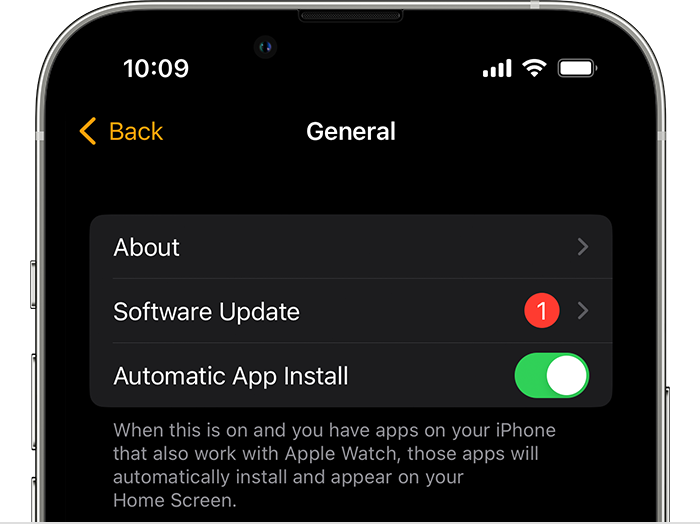
We would like to see how we can help you with these issues with your Watch and iPhone. Please back up and update to our latest iOS, 16.5, and let us know if the issue persists. The steps in this link will walk you through the process: Update your iPhone or iPad - Apple Support


"Update your iPhone or iPad wirelessly

  1. Back up your device using iCloud or your computer.
  2. Plug your device into power and connect to the internet with Wi-Fi.
  3. Go to Settings > General, then tap Software Update.
  4. If you see more than one software update option available, choose the one that you want to install.
  5. Tap Install Now. If you see Download and Install instead, tap it to download the update, enter your passcode, then tap Install Now. If you don't know your passcode, learn what to do."


Once that is complete, follow the steps in this link to be sure you are running the latest watchOS 9.5: Update your Apple Watch - Apple Support


"Update your Apple Watch using your iPhone

You can wait until Apple Watch notifies you when a new update is available. Tap Update Tonight in the notification, then go to your iPhone to confirm that you want to update overnight. At the end of the day, leave your Apple Watch and iPhone charging overnight so the update can complete.

Or you can update your Apple Watch with your iPhone manually:

  1. On your iPhone, open the Apple Watch app, then tap the My Watch tab. 
  2. Tap General > Software Update.


2.Download the update. If asked for your iPhone passcode or Apple Watch passcode, enter it. 

3.Wait for the progress wheel to appear on your Apple Watch. It could take from several minutes to an hour for the update to complete."


Cheers!


Jan 11, 2024 11:22 PM in response to mariafromdarlington

I also have the same issue. My sleep schedule is set to 11:00 pm to 6:00 am, with 30 minutes winddown time. Sleep mode focus will turn on at 10:30 pm in the morning it will turn off at 6:00 am. But a few minutes later "Sleep focus" will turn back across the device.


MacOS : 14.2.1 (23C71) on iMac and 14.2.1 on MacbokPro

iOs: 17.2.1

iPadOS : 17.2

WatchOS : 10.2


Can someone help? Please!


Jun 26, 2024 4:34 AM in response to BetsyMacWilson

I am having the same issue. I always run the most up to date software versions on both my iPhone and my Apple Watch, but in the several few weeks, and especially after upgrading to a new iPhone 15 Pro a few weeks ago, my Watch does not respect the Sleep schedule that is set in my profile. My phone wakes up following the schedule on time, but my watch remains asleep, even though when I look up the sleep schedule on my watch, the schedule displays correctly (for example, it is 7:30am for me now, my sleep schedule ended at 6:30am, and my phone is awake, but my watch is still asleep.).


I've had the watch for 2 years and this was never an issue before. It seems to be a new issue in the last several weeks.


No matter what I try, the watch still sleeps after I get up, and it seems to wake up later in the day following some different schedule, which I cannot figure out what that schedule is.

Jun 28, 2024 11:47 PM in response to homewarrior

Unfortunately I have the same problem. My sleep schedule is set as usual with watch and phone. After the standard good morning message including current weather situation I’m off to the bathroom to make myself ready for work and after a while when I’m wondering why my screen is dimmed I have to realize that sleep mode turned itself back on. So I have to manually turn it off to stay off. Very bad bug because I miss a lot of important notifications till I’m realizing the problem.

This thread has been closed by the system or the community team. You may vote for any posts you find helpful, or search the Community for additional answers.

Sleep Mode keeps switching on during day, wake alarm not going off on watch

Welcome to Apple Support Community
A forum where Apple customers help each other with their products. Get started with your Apple Account.