Why does keychain not allow multiple URL for the same account entry?

Apple Keychain does duplicate website entries when multiple URLs/domains correspond to the same organisation (same account).


For example:

  • University: university.com
  • Student profile page: students.university.com
  • Corporate Webmail: universitywebmail.net
  • University library: university.library.com

Those example 4 domains rely on the same credentials.


Safari/iOS would create 3 entries: one for *.university.com, another one for universitywebmail.net and a third one for university.library.com. Ironically, Safari would warn you about the risks of repeating passwords on different websites (which are actually not).


They are actually the very same account and for those credentials that could very well be grouped in a single entry, but 3 entries would have been created.


Sometimes Safari will (randomly?) decide to create multi-URL password entries, but they are still not manageable.


There is no way to manually edit/merge credentials in this way, nor on iOS/MacOS Keychain/Safari/System preferences.


What is the rationale for this behavior and how can it be workarounded to merge entries?

Thanks.

MacBook Air 13″, macOS 12.6

Posted on Dec 27, 2022 8:10 AM

Reply

Similar questions

2 replies

Dec 28, 2022 12:38 PM in response to Fling2387

Hello Fling2387,


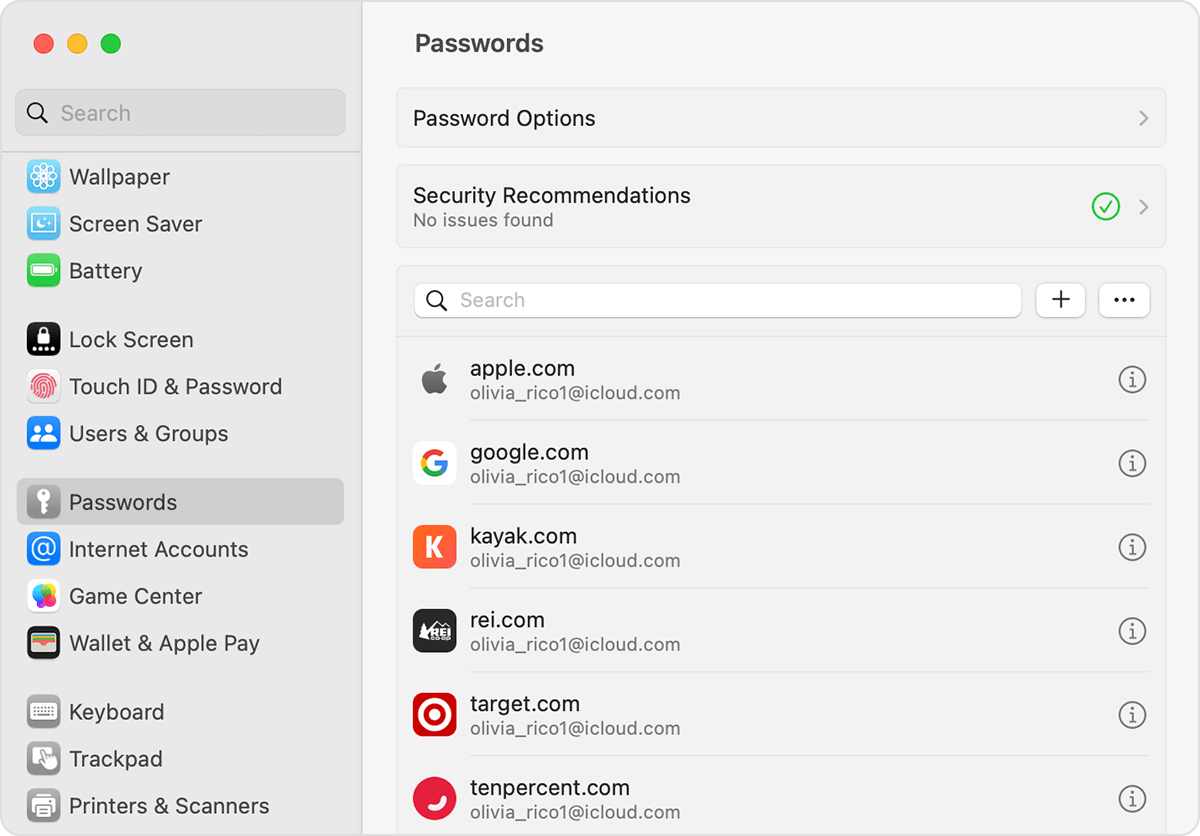
Although there is no way to merge the websites, you can delete the additional websites and their passwords if one of the websites is considered the main one and once signed in, will allow you to navigate to the others. More info on deleting passwords can be found here: How to find saved passwords and passkeys on your Mac and below.


"View saved passwords and passkeys in System Settings

  1. Choose Apple menu  > System Settings. In macOS Monterey, choose Apple menu  > System Preferences. 
  2. Click Passwords.
  3. Sign in with Touch ID, or enter your user account password.
  4. Select a website, then click the Show Details button . In macOS Monterey, click Edit.

On Mac, see your saved passwords and passkeys in System Settings

    • To delete a password, click Delete Password"


Best regards.


Dec 28, 2022 2:18 PM in response to K_Wall44

Dear K_Wall44,

I understand your point of view on this issue but this is actually not operative since login in many websites is frequently done through different domains/URLs and will be recognised as different and offered to create a new entry instead of selecting an already existing one.


Plus, one can not actually tell Safari to autofill in university.com, for example, with university.library.com's credentials (assuming both would be the same login) because domains do not match.


One would say: okay, I navigate to my "Passwords" menu and copy & paste the credentials –well, this is not optimal (Apple product design is supposed to be excellent), nor adviseable since it is counterintuitive, plus it is insecure because clipboard is accessible systemwide (another app could eventually take passwords from it) and it does not change anything since Safari would offer to save those credentials, once again creating a new entry in the password manager.


I have no experience with passkeys but it looks to me like if one SSO login would use passkeys and login to that same account on another domain connected to the same login server must be done, it could not be performed because of autofill and no matches with saved passkeys... (correct me if I were wrong, please).


Merging entries would workaround this situation but the ideal behavior would be to manually be able to tell Safari what to autofill with which entry, to manually being able to manage keychain passwords' URLs and so on.


Keychain entries is not a beginner user would care of, but the company should cover as many user cases as possible provided they offer one product with an apparent focus on democratising security on the net.


Many thanks.

This thread has been closed by the system or the community team. You may vote for any posts you find helpful, or search the Community for additional answers.

Why does keychain not allow multiple URL for the same account entry?

Welcome to Apple Support Community
A forum where Apple customers help each other with their products. Get started with your Apple Account.