Airport Utility can't find Time Capsule

Mojave 10.14.5 on a MacPro - Use my Time Capsule (5th Gen) as a Wireless Router (5GHz & 2.5 GHz) only - connected to my Internet Modem via ether cable - have a separate HD for Time Machine back-ups.


Status light flashing amber - WiFi working great - opened Airport Utility but it does not recognize the TC


Followed Bob Timmons advice & set Configure IPv6 to Link Local Only (WiFi & Ethernet) & then restarted the Mac


Status light now green but Airport Utility does not recognize the TC


Advice??


Thanks!

…John 


Mac Pro, macOS 10.14

Posted on Jun 11, 2019 2:44 PM

Reply
Question marked as Top-ranking reply

Posted on Jun 11, 2019 5:59 PM

You need to power cycle the network actually.


Since I presume your ISP modem is main router.. that is the device that is handing out IP addresses and a lot of products out there work poorly with bonjour.


My take on hayden's instructions is to power down all the network devices.. which means unplugging those without on/off switch.. as well as the MacPro .. not sleep .. actually shutdown.. no need to unplug it though. It is also good to shut down all the clients.. but the MacPro for sure.


Start up the network again in correct order.

ISP modem router.. wait 2min

Time Capsule.. wait 2min

MacPro..


Now see if the airport utility can find the TC. It will very likely work for an hour or so.. maybe even a day.. if it then disappears again I suggest you change to static IP on the TC. By default if the TC is the main router it will have a static IP.. 10.0.1.1 by default. But in bridge it will change IP regularly.. this causes issues especially on later versions of Mac OS.


The CORRECT method is to set DHCP reservation in your main router so it always hands out the same IP to the TC. If this is difficult or not available.. the next NEAR TO BEST method is simply set the IP on the TC itself.


Open the airport utility and click on the icon of the TC.. click on edit in the summary that comes up.
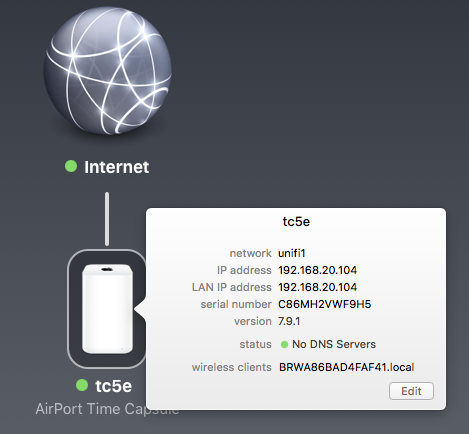


Go to the Internet tab.

It will look something like this with IP from your main router.
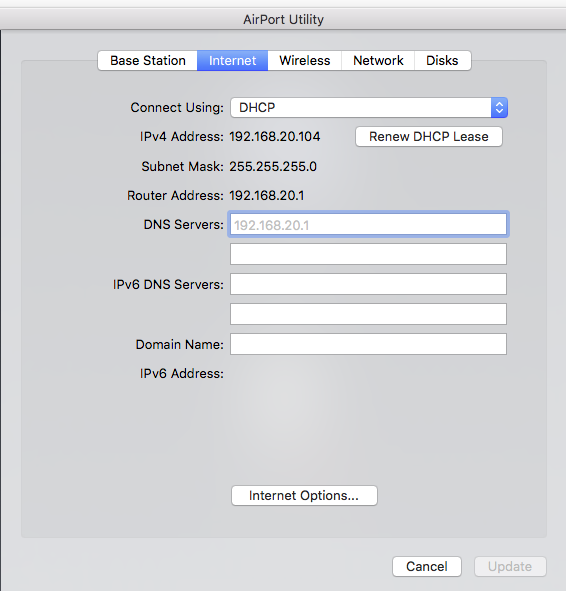

Select Static as your method of connection.



This will swap all the current values without you needing to do anything. And it will be locked.
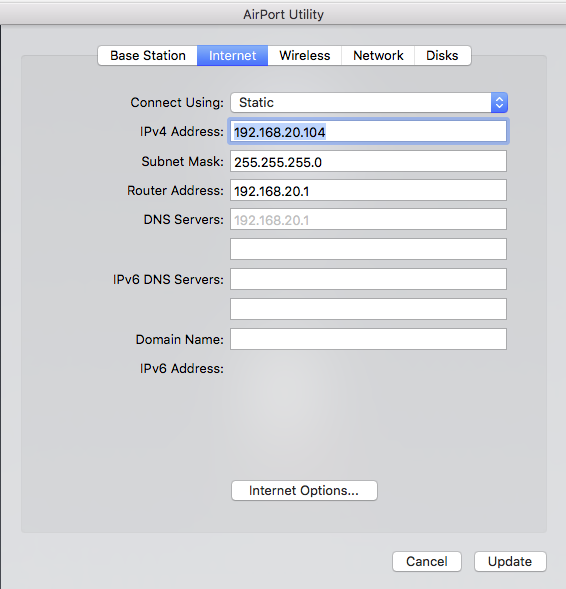


Now if you get complaints about DNS fix them using google public etc.. 8.8.8.8


(A variant on the above is to set the IP manually .. so currently I have an IP of 192.168.20.104 .. not such a convenient IP to remember so I can set last digit to 100.. or 200.. as long as nothing else on the network is using it). A fixed ip will not change so if you have issues in the future you can then do a connection by using the fixed IP directly in airport utility.
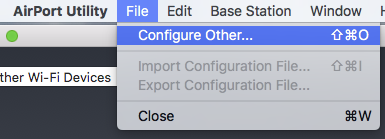


Just type your IP into the popup box and password.


One other thing.. make sure your domain is empty or set to local.

This one is a bit tricky. Some ISP will send your router and thence to the computer a search domain in their system. I have seen this cause issues.

Open your network preferences in the computer.. go to the DNS and domain tab and remove any domain so it is blank.


The way I solve it is to set all elements on my network to local (this is the domain locked into the TC).
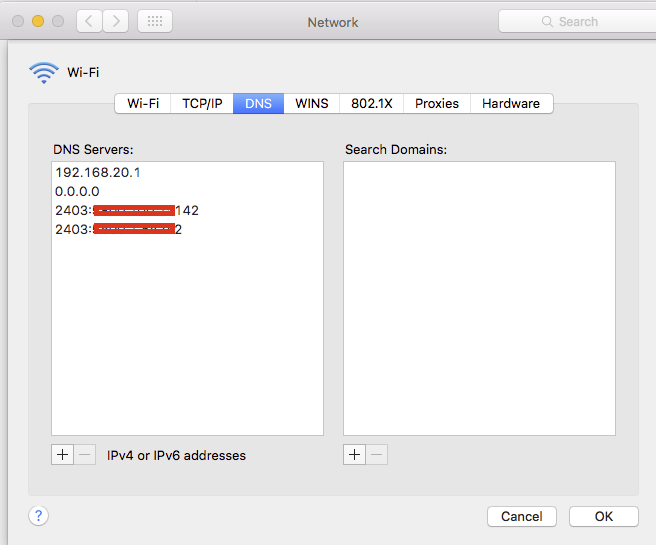


If you actually have a domain set by ISP.. select it and click the - button at the bottom to remove it. You do not need it and it causes issues since the Apple Routers seem to do poorly in picking up domain.

Similar questions

4 replies
Question marked as Top-ranking reply

Jun 11, 2019 5:59 PM in response to John Bonn

You need to power cycle the network actually.


Since I presume your ISP modem is main router.. that is the device that is handing out IP addresses and a lot of products out there work poorly with bonjour.


My take on hayden's instructions is to power down all the network devices.. which means unplugging those without on/off switch.. as well as the MacPro .. not sleep .. actually shutdown.. no need to unplug it though. It is also good to shut down all the clients.. but the MacPro for sure.


Start up the network again in correct order.

ISP modem router.. wait 2min

Time Capsule.. wait 2min

MacPro..


Now see if the airport utility can find the TC. It will very likely work for an hour or so.. maybe even a day.. if it then disappears again I suggest you change to static IP on the TC. By default if the TC is the main router it will have a static IP.. 10.0.1.1 by default. But in bridge it will change IP regularly.. this causes issues especially on later versions of Mac OS.


The CORRECT method is to set DHCP reservation in your main router so it always hands out the same IP to the TC. If this is difficult or not available.. the next NEAR TO BEST method is simply set the IP on the TC itself.


Open the airport utility and click on the icon of the TC.. click on edit in the summary that comes up.


Go to the Internet tab.

It will look something like this with IP from your main router.


Select Static as your method of connection.


This will swap all the current values without you needing to do anything. And it will be locked.


Now if you get complaints about DNS fix them using google public etc.. 8.8.8.8


(A variant on the above is to set the IP manually .. so currently I have an IP of 192.168.20.104 .. not such a convenient IP to remember so I can set last digit to 100.. or 200.. as long as nothing else on the network is using it). A fixed ip will not change so if you have issues in the future you can then do a connection by using the fixed IP directly in airport utility.


Just type your IP into the popup box and password.


One other thing.. make sure your domain is empty or set to local.

This one is a bit tricky. Some ISP will send your router and thence to the computer a search domain in their system. I have seen this cause issues.

Open your network preferences in the computer.. go to the DNS and domain tab and remove any domain so it is blank.


The way I solve it is to set all elements on my network to local (this is the domain locked into the TC).


If you actually have a domain set by ISP.. select it and click the - button at the bottom to remove it. You do not need it and it causes issues since the Apple Routers seem to do poorly in picking up domain.

Jun 13, 2019 8:08 AM in response to LaPastenague

Really appreciate the comprehensive instructions!

I downloaded the iOS version of Airport Utility to my iPad which somehow recognized my TC

I then set Configure IPv6 to Link Local Only on the TC

This resulted in a notice that the TC required a firmware update

After updating, I powered down the TC - re-powered - things have worked great (solid green light & Airport Utility on the MacPro recognizes the TC!) for past 48 hours.

Here's hoping!

This thread has been closed by the system or the community team. You may vote for any posts you find helpful, or search the Community for additional answers.

Airport Utility can't find Time Capsule

Welcome to Apple Support Community
A forum where Apple customers help each other with their products. Get started with your Apple Account.