Apple Savings

I have opened up an Apple Savings and linked my bank account (savings account). It will not let me add money to Apple Savings from my bank account. The message says NOT AVAILABLE FOR TRANSFERS. For security, only bank accounts that are verified can be used for transfers. How do I get the bank account verified?

Posted on Apr 18, 2023 12:37 PM

Reply
Question marked as Top-ranking reply

Posted on May 5, 2023 5:35 AM

I believe Apple Savings only allows transfers from checking accounts. I had the same issue with Robinhood, and capital one savings, but after adding capital one checking it worked immediately. Try a checking account.

5 replies

Apr 18, 2023 12:50 PM in response to kick100

Not all bank account, investment accounts and retirement accounts will be eligible for transfer. Please confirm with the issuing bank that the account is eligible for transfers to Apple Savings Account. Once verified, please follow the steps below,


Deposit money into Savings


When you open Savings you agree to automatically deposit Daily Cash that you earn into your Savings account.3 You can also add money to Savings from a linked external bank account or from Apple Cash.


  1. On your iPhone, open the Wallet app and tap Apple Card.
  2. Tap Savings account, then tap Add Money.
  3. Enter the amount that you want to add, then tap Add.
  4. Select or add the payment source that you want to add money from.
  5. Double-click the side button to confirm with Face ID, Touch ID, or your passcode.


Money that you deposit into Savings starts earning interest on the day that the transfer is initiated from the Wallet app.


If you transfer money from Apple Cash, the funds are typically available instantly. If you transfer money from a linked external bank account, it will generally take a few days for funds to be available for withdrawal.


If you have not added the external account to your Wallet on your iPhone please follow these steps.


How to add money to Apple Cash


After you set up Apple Cash, you can add money to your balance using the debit or prepaid cards that you already use with Apple Pay in Wallet. If you don’t already have one of these cards in Wallet, you need to add one before you can add money.
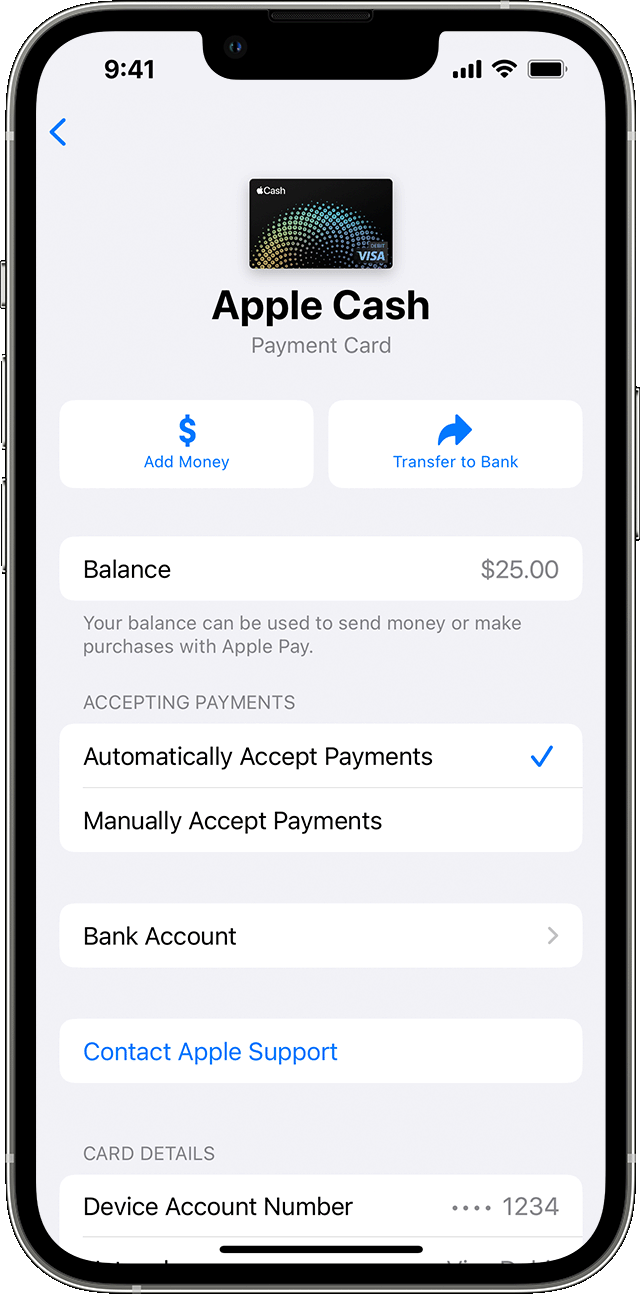


  1. Go to your card info:
    • iPhone: Open the Wallet app, tap your Apple Cash card, tap the More button , then tap Add Money.
    • iPad: Open the Settings app, tap Wallet & Apple Pay, tap your Apple Cash card, then tap Add Money.
    • Apple Watch: Open the Wallet app, tap your Apple Cash card, tap Card Balance, then tap Add Money


  1. Enter an amount. The minimum is $10.
  2. Tap Add, then confirm the U.S. debit or prepaid card2 that you want to use to add money, and confirm the correct billing address. To use a different debit or prepaid card, tap the arrow  next to your card, then choose a card.

  3. Confirm with Face ID, Touch ID, or passcode.


To make sure that your balance is updating, you need a cellular or Wi-Fi connection.


If you continue to have errors or frustration with the process, please contact Goldman Sach support team,


CONTACTING — Goldman Sachs Bank 

Using Messages; chat with an Apple Card specialist

Call toll-free at 877-255-5923; or

Write to: Goldman Sachs Bank, Lockbox 6112, P.O. Box 7247, Philadelphia, PA 19170-6112.

May 5, 2023 5:49 AM in response to ssublyme

Apple Savings won’t transfer via a debit card (usually attached to checking account),in my experience, but will transfer to both checking and savings accounts via ACH transfers. I’ve verified my external accounts through the external accounts iPhone app or website. This worked for Chase, 5/3, Wells Fargo and several investment accounts.


I think where people are have issues, is trying to verify from Apple Savings side.


So, if I want to send money from Chase account I got to my Chase app and push to funds to Apple Savings. When I want to transfer funds from Apple Savings, I go to Chase app and pull funds from Apple Savings.


If I want instant transfer with no fee, I use Apple Cash account.

Apr 27, 2023 3:43 PM in response to kick100

You probably have to add your Apple Savings account to your bank transfer profile.


I just added my Apple Savings account to my Fidelity account using the Routing and Account number - Fidelity transferred two <$1 amounts to my Apple Savings account, and withdrew the sum of the two transactions. I had to verify the transfer amounts for the account to be flagged verified.


I just added Apple Savings to my Chase account - it hasn't happened yet, but I assume it will be a similar process (the Apple Savings account in my Chase External Accounts section is still in a pending state).


They just want to verify that you didn't fat finger the routing or account numbers - there's really no security in the bank transfer system, so this is the only way they can verify you toggled in the right account.


The EFT system really needs an overhaul with some kind of authentication - it's really ripe for abuse.

May 5, 2023 6:00 AM in response to Jeff Donald

I understood the issue as someone 'from' Apple savings not able to add a bank account (in my experience Savings). One is not able to pull money into apple savings from apple savings, or push money out from apple savings becasue they can't add an account. You've described pulling money out of apple savings from Chase or pushing money to apple savings from Chase.


What's equally odd for me, I can add the same Robinhood bank account(serviced by JPM) to Apple Credit card, but Apple Savings won't accept it.

This thread has been closed by the system or the community team. You may vote for any posts you find helpful, or search the Community for additional answers.

Apple Savings

Welcome to Apple Support Community
A forum where Apple customers help each other with their products. Get started with your Apple Account.
